Understand
Analytics & Reporting
A KPI tile that has nothing to compare against shows a dash, not an invented percentage. That one design choice says more about this than a features list does.
Built to fail honest, not fail loud
Nine dashboards share one renderer, so a new one does not mean a new set of bugs — and the same claim discipline is enforced in the code, not left to the copy.
A dashboard for the module you are in
Sales, Inventory, Appointments, People and Finance each get KPIs and charts built for what that screen actually tracks, sharing one underlying renderer rather than nine hand-built pages.
A KPI that never fakes a trend
When there is no prior period to compare against, the tile shows a dash — not a fabricated "0% change" dressed up as data.
Reports that respect who is asking
Every report sits behind both a module entitlement and a named permission, the same discipline already applied to Finance and Projects — not a screen hidden by the menu and reachable anyway.
A real time-card report
Clock-in and clock-out hours read against the schedule that specific branch set, so a late arrival shows against the shift it was actually late for.
Sales sliced the ways that matter
By item, category, staff, area and device — each its own report, rather than one screen wearing five hats badly.
Export bound to what you are looking at
A download carries exactly the rows on screen, branch boundary included, with money written as a real number so it sums correctly the moment it lands in a spreadsheet.
Two kinds of number, kept apart
The sales, staff and stock reports read the orders, drawers and stock movements as they sync from the tills — operational figures, as of the last sync. The financial statements read the ledger. When a sale has posted, the two agree; when posting is not switched on, the sales report is the takings figure and the ledger carries what the invoices say. The page tells you which one you are looking at.
Honest about timing
Cloud-side reports reflect what has synced up from the counter, not the instant a sale happens offline — a till trading with no connection will show on the dashboard once it reconnects, not before.
A dashboard built for what you are looking at
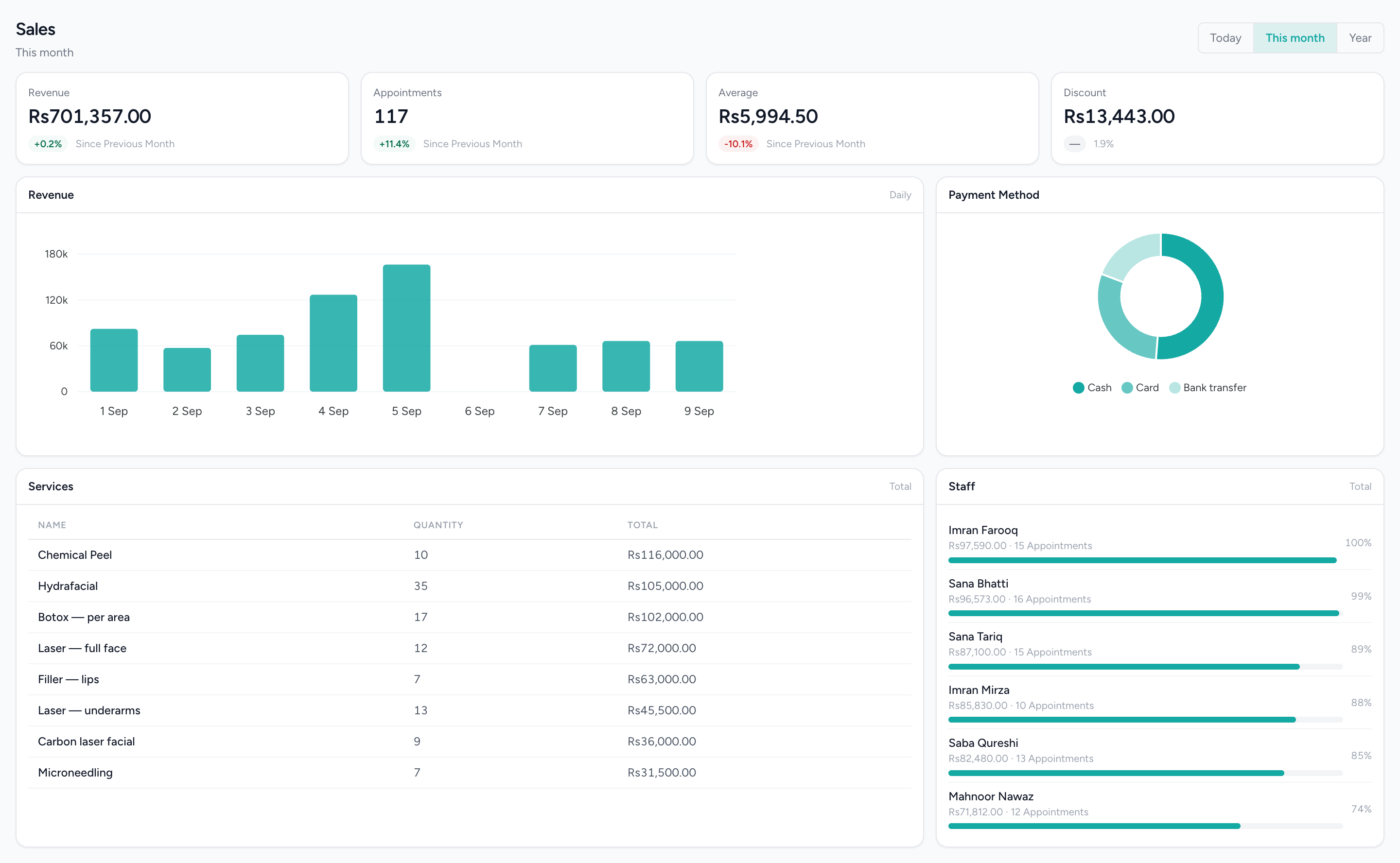
Revenue and order KPIs, a daily revenue trend, how customers paid, and the top-selling items and staff for the period — scoped to the branch you are working in.
Questions people actually ask.
The answers a decision-maker needs before booking a demo.
Are IMFlow360 dashboards real-time?
Almost. Dashboards update as soon as each sale reaches IMFlow360, which is immediate when the till is online. Sales made offline appear once that till reconnects, and the till's own totals are always live.
Can I export IMFlow360 reports to Excel or PDF?
Yes. Financial statements download as PDF, Excel or CSV, sales and staff-hours reports download to Excel, and HR reports download as CSV or PDF.
What reports does IMFlow360 include?
IMFlow360 includes sales reports by service, product, category, hour and staff member, staff hours, stock and purchasing dashboards, HR reports, and full financial statements. Dashboards compare the period you choose with the one before, so trends are easy to spot.
Does IMFlow360 use AI for sales forecasting?
Not yet. Every figure in IMFlow360 reports comes from what actually happened — sales, bookings, stock and accounts — with no forecasting or automatic recommendations today.
Used in these solutions
Popular with
- RetailShelf, till and books that agree: barcode sales, stock, purchasing and cash control.Read more
- RestaurantsOrders, cash and stock that agree at close, on tills that keep working offline.Read more
- Hair SalonsBuilt around the chair — stylists, colour services and the client who asks for one by name.Read more
- DentalThe business side of a practice: the diary, the front desk and the books — not the charting.Read more
Related capabilities
- Accounting & FinanceA real double-entry ledger: chart of accounts, vouchers, periods, and the statements that come off them.Read more
- Point of SaleOffline-capable tills that cluster over your own network, with drawer control and PIN-gated voids.Read more
- HR & PayrollRoles, shifts, attendance, leave, documents, hiring and payroll runs.Read more
- Multi-LocationOne login, branch-scoped stock, staff and figures, and a P&L per location.Read more
A number you can trust is worth more than one that looks impressive.
We will show you the module on a real dataset and tell you plainly what it does not do yet. Email sales@imflow360.com or book a walkthrough.