Orders, cash and stock that agree at close
A restaurant’s day is a hundred small orders, a drawer that several people reach into, and deliveries that arrive while service is on. IMFlow360 puts a record on each of those at the counter, and carries it through to the stock count and the ledger without a second system.
What goes wrong between the first order and the last count
The internet drops mid-service
A till that is a browser tab stops when the connection does. The queue waits, orders go on a pad, and the pad gets typed in twice or not at all.
Two counters, two versions of the truth
An order started at the counter is paid at the door, and the second till has never heard of it. Somebody rings it again, or nobody does.
A void is an order that vanished
A wrong order is deleted rather than recorded, so the day’s takings are the total of whatever survived and nobody can say what was cancelled, by whom, or why.
The drawer is short and everyone has a theory
The float was whatever was left last night, cash went out for the milk, and a refund was given by someone who has gone home. None of it was written down at the time.
Deliveries are paid from the bill, not the delivery
The supplier’s invoice is what is in front of you, so it is what gets paid. Whether the quantities match what was ordered or what actually came through the back door is never checked.
Each site’s profit is a guess
With two or three sites, the takings are known and the costs are one pile, so nobody can say which kitchen is making money and which is being carried.
Where IMFlow360 fits a restaurant
The till is built for a counter that cannot stop. A terminal that has been set up holds the whole menu, prices, taxes, service charges, staff and PINs in its own database, so recording an order or a payment needs no call to our servers — the day goes up afterwards. Several terminals find each other over your own network and share the open orders and the trading day, so an order taken at one counter is settled at another, while each keeps its own drawer.
Behind the counter, the purchasing chain gives each delivery a document: a purchase order, a goods receipt for what actually arrived, and a vendor bill that posts to payables when it is approved. Stock is counted by the item you buy — a case, a bag, a bottle — and costed at a moving average, and the accounting module keeps a real ledger with a profit and loss per site.
Two things to know before a demo. Every order goes through the till’s booking-style order path and names a guest with a mobile number; that is right for a table and heavy for a takeaway coffee, and we would rather show you how it feels than talk around it. And the kitchen is not on the system today — there is no kitchen ticket, printer or display at the till.
A day on the system
From the float in the morning to the last drawer at night, each step names the part of IMFlow360 doing the work.
- Step 1
Open the drawer on a counted float
Each terminal opens its drawer with the float carried over from its last close, plus anything you add, in Point of Sale. Cash belongs to the person holding it, so each counter has its own.
Point of Sale - Step 2
Staff sign in and clock in on the till
A six-digit PIN checked on the device, so it is the same speed with or without a connection. Selling is one level of access; opening, closing and refunding the day is another. The clock-in feeds attendance in HR & Payroll.
HR & Payroll - Step 3
Take the order at whichever counter is free
The order names the guest, the staff member serving and, where you have set the room up with seats, the seat. Open orders are shared across the terminals over your own network, so the order started at the bar is settled at the door.
Point of Sale - Step 4
Settle the table
A bill is split by guest, evenly, or by a custom amount. Cash is recorded with the change owed; a card taken on your own machine is recorded against the order as its own line. A tip left on the customer display goes onto the order, and the receipt shows on screen and can be reopened from the order list.
Customers - Step 5
Void or refund under a manager
A void or a refund needs the manager PIN and a reason, and a refund writes a reversing entry against the order rather than editing the original. The takings figure is what was taken, not what survived.
- Step 6
Book the delivery at the back door
A goods receipt against the purchase order for what actually arrived, in Purchasing. Stock goes up at that site and the item’s moving average cost is updated. The vendor bill is matched to the order and the receipt, and posts to payables on approval.
Purchasing - Step 7
Close on counted cash
Count the drawer against the expected figure with the variance shown as you type. A day with orders still open does not close — it drains until they are settled or a manager forces it — and the last drawer to close closes the site. Each terminal builds its own day report from what is on it.
Analytics & Reporting - Step 8
Let the books catch up
Cost of sales for product lines posts as orders sync. Posting the sale itself is switched on per business in Accounting & Finance; once it is, a refund or void reverses the entry it made. Profit and loss reads by site, and payroll runs from the attendance the till recorded.
Accounting & Finance
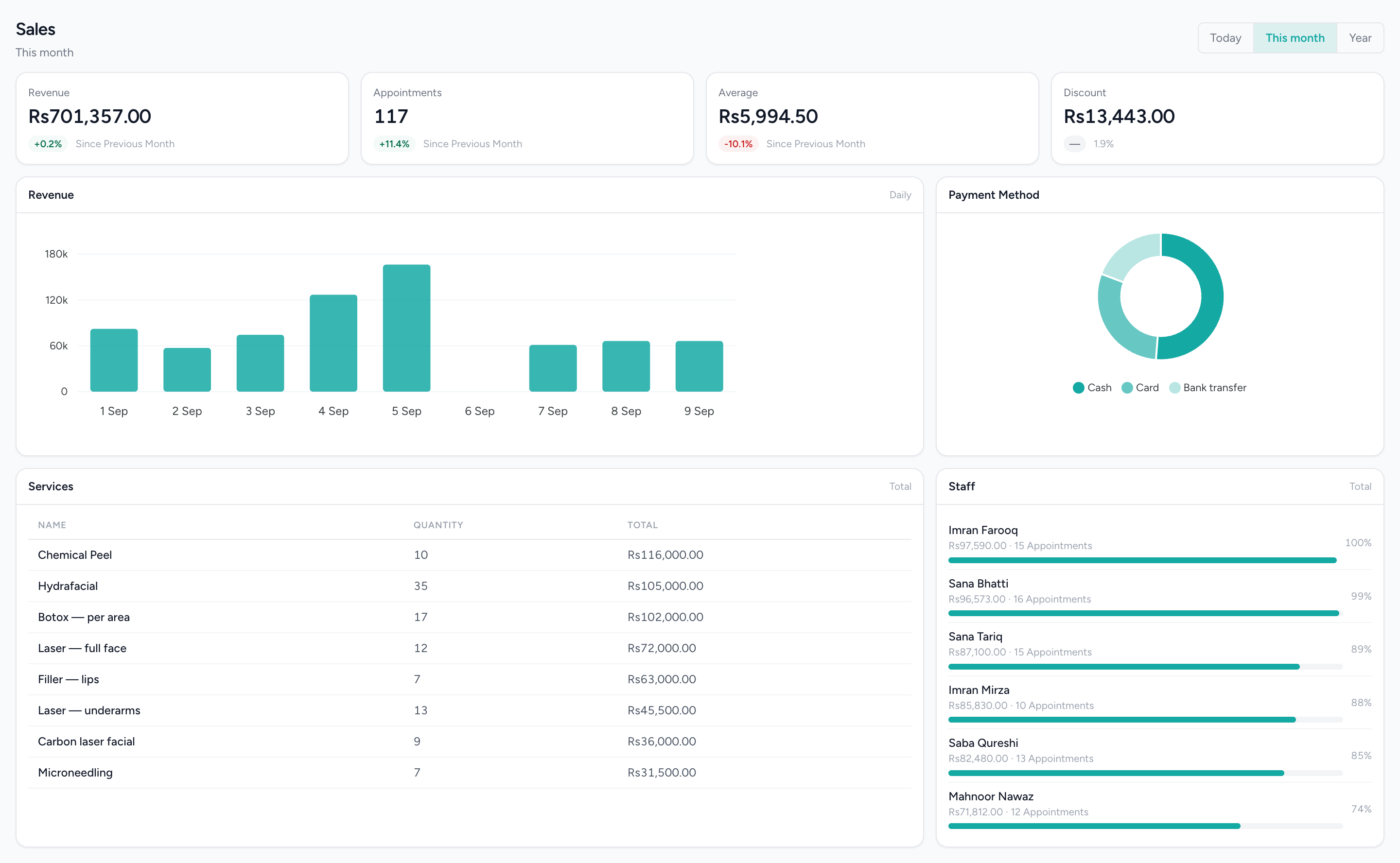
The day’s takings, by item and by tender
Revenue and order KPIs, the daily trend, how customers paid and the top-selling items — from the tills, once they have synced.
Who uses it, and for what
The owner
Reads takings, payment mix and top items per counter, and a profit and loss per site from the ledger. Sees low stock and overdue supplier bills across every site whichever one they are looking at.
Whoever is on the counter
Signs in with their own PIN, takes and settles orders at any terminal, records cash in and out against a reason, and never waits for the internet to do any of it.
The manager on shift
Holds the manager PIN for discounts, voids and refunds, forces a close when a table has walked, counts the drawers, and approves attendance corrections rather than editing them quietly.
The accountant
Gets the ledger and the reports and nothing else, with a chart of accounts seeded from a restaurant template, bills already posted to payables, and the trial balance, P&L and balance sheet on screen and exported.
What runs today
Everything in this section can be shown on a live system today.
A till that keeps taking orders offline
Menu, prices, taxes, service charges, staff and PINs live on the terminal. Orders, payments and cash movements are recorded on the device first and sent up once, matched on their own identifier, so a retry never duplicates a sale.
Several counters, one set of open orders
Terminals discover each other over your own network, share the open orders and the trading day, and elect a coordinator between themselves. One counter going down is a counter that stops, not a shop that does.
Cash control on every drawer
A float carried over, cash in and out with a reason, a counted close with the variance shown, a draining state while orders are still open, and the last drawer closing the site.
Voids and refunds with a name and a reason
Discounts, price overrides, voids and refunds sit behind the manager PIN once switched on. A refund is a reversing entry; the original order stays as it was.
Purchasing from order to paid bill
Purchase orders, goods receipts for what arrived, vendor bills matched and approved into payables, debit notes for what went back, and payments made allocated across bills. Stock is costed at a moving average per item and site.
A ledger with a P&L per site
Double-entry accounting in the same system as the tills: a seeded restaurant chart of accounts, bills and payments posting on approval, and Profit & Loss by branch on screen and exported.
Rotas, attendance and payroll
Staff clock in on the till, corrections go through an approval, leave is requested and approved, and payroll runs from the attendance sheets — not from what anyone sold.
Upcoming · designed, in build
Restaurant POS edition
Designed and in build. Nothing below is in the product yet; it is listed so you can see where the platform is going for this trade, not to be quoted or demonstrated.
Open-order grid, status and list
Every open order on one screen, by status, with a list view for the same orders.
Combine orders
Bring two open orders together into one.
Online orders
Orders that arrive from outside the counter, shown alongside the ones taken at it.
Order types and guest count
An order carries its type and the number of guests on it.
Table map
A map of the floor, with the tables on it.
Guest assignment and reassignment
Guests assigned to an order, and moved to another when a party changes.
Order builder with item modifiers and cart actions
Build the order item by item with modifiers on each, and act on the cart as a whole.
Payment screen
A payment screen designed for the restaurant order.
What it does not do
In this trade's own words: what people ask for that the platform does not do.
- No kitchen ticket, kitchen printer or kitchen display at the till today. The order is recorded and settled at the counter; getting it to the pass is still a person’s job.
- No table reservations, and no table map at the till today — the table map is in the Restaurant edition design, and nothing takes a booking for a table.
- No delivery-marketplace integration. Orders from a third-party app are keyed in like any other.
- No recipe or ingredient costing. Stock is counted and costed by the item you purchase — the case, the bag, the bottle — not by the dish, and selling a dish does not draw down its ingredients.
- The till does not process cards. A card or wallet payment taken on your own machine is recorded against the order so the day reconciles; the money never touches this software.
- Posting till sales to the ledger is switched on per business, not on by default. Until it is, only cost of sales for product lines reaches the ledger and the takings appear in the sales and cash-flow reports.
Questions from businesses like yours.
What owners ask before they move a live business onto a new platform.
Can an order started at one till be paid at another?
Yes. IMFlow360 tills in the same branch share open orders over your own network, so an order taken at the bar can be paid at the front without re-entering it. Each till keeps its own cash drawer.
Can restaurants take table reservations in IMFlow360?
Yes, in the IMFlow360 web dashboard and POS. Staff can enter reservations and guests can book on your IMFlow360 customer page; you then assign a table and mark guests as confirmed, arrived, cancelled or no-show.
Can guests order from their table with a QR code?
Yes. Each table in IMFlow360 gets its own QR code; guests scan it to order from your IMFlow360 customer page or to call a waiter, and their orders go straight to the kitchen ticket board.
How does a table split the bill in IMFlow360?
By guest, equally, or by amounts you choose, with each payment recorded against the order, so a table can pay part in cash and part by card. Splitting by individual item isn't available yet.
Can IMFlow360 tell me what each dish costs to make?
Not yet. Stock is costed by the items you buy — a case, a bag, a bottle — at an average cost updated with each delivery, and Profit and Loss shows each branch's margins. Selling a dish doesn't use up its ingredients, so per-dish cost isn't calculated.
Solutions for this business
- Cash & Till ControlEvery rupee in the drawer explained: floats, variances, voids and the day close.Read more
- Stock & Purchasing ControlKnow what you bought, what arrived, and what you still owe for it.Read more
- Business ContinuityWhen the internet goes, the shop keeps selling.Read more
- Multi-Location OperationsRun five branches like one business, and read them like five.Read more
The platform behind it
- Point of SaleOffline-capable tills that cluster over your own network, with drawer control and PIN-gated voids.Read more
- InventoryStock that moves when a sale syncs, with goods received, transfers and reorder points.Read more
- PurchasingVendors, quotations, purchase orders, goods receipts, bills and payments made.Read more
- Accounting & FinanceA real double-entry ledger: chart of accounts, vouchers, periods, and the statements that come off them.Read more
- HR & PayrollRoles, shifts, attendance, leave, documents, hiring and payroll runs.Read more
See a service run with the internet unplugged.
We will show you two counters sharing an order, a drawer counted at close, and a supplier bill landing in payables — and tell you plainly what the kitchen still has to do by hand. Email sales@imflow360.com or book a walkthrough.