Back office
Accounting & Finance
Most point-of-sale systems end at the receipt and hand you a CSV. This one keeps a general ledger — the same books your accountant would keep, in the same system your counter runs on.
A ledger, not a spreadsheet export
Double-entry, multi-tenant, and enforced by the software rather than by whoever is careful that week.
A chart of accounts that starts pre-built
Five levels, five account natures and around twenty-six groups, seeded automatically for a new business from an industry template — services or restaurant. Codes are generated in segments, and posting is only ever allowed to a leaf account, so nothing lands on a heading.
Double-entry it will not let you break
Debits must equal credits before a voucher can post, and an unbalanced entry is refused. Drafts can be left unbalanced while you work; posted entries cannot be. There is an optional period lock for closed months.
The statements, on screen and out the door
Trial Balance — with an explicit warning if it does not balance — Profit & Loss, Balance Sheet, Cash Flow, General Ledger with a running balance per account, Monthly P&L and P&L by branch. Every one of them prints, and exports to PDF, Excel and CSV.
Invoices, bills and payments that post
A sale invoice, a cash invoice, a credit note and a payment received each write their journal entry the moment they are issued, approved or recorded — receivables, revenue and tax, without a separate bookkeeping step. Estimates and sales orders are working documents and do not post; the invoice raised from them does. Delivery notes can post cost of sales when that mode is switched on for the business.
The purchase side, in full
Vendors, requests for quotation, vendor bids, purchase proposals, purchase orders, goods receipts, vendor bills, debit notes and payments made. A bill posts to payables and to stock, purchases or expense per line when it is approved; a debit note and a payment made post likewise. A goods-received-not-invoiced clearing account and three-way matching between order, receipt and bill are available and switched on per business.
How the counter reaches the ledger
Product sales at the till post cost of sales against stock as they sync. Posting the sale itself — cash or bank, revenue per item, output tax, service charge — is switched on per deployment, and once it is, a refund or void reverses the entry it made. Until it is switched on, the till reports its takings in the sales and cash-flow reports and the ledger is fed by the invoices you raise.
Who owes you, and who you owe
Customer Statement of Account, Aged Receivables, and payment allocation on the sales side. Vendor Statement of Account and Aged Payables on the purchase side. Both by branch.
Recurring entries that turn up on their own
A journal voucher template runs weekly, monthly, quarterly, half-yearly or yearly, generates on a nightly schedule, keeps an execution log and emails the people you name. Recurring sales invoices generate as drafts, for review before they go out.
Opening balances, with a look before you leap
Bring in your existing balances through a dedicated screen with a preview step, so you can see what will be posted before anything is.
Bank accounts and transfers
A register of cash, bank, card and money-in-transit accounts, each tied to its ledger account, plus transfers between them that post a balanced journal entry with an exchange rate where the currencies differ.
Nobody sees more than they should
Every accounting screen and every action behind it — view, create, post, export — is a named permission, and the whole module is a per-package entitlement. An accountant can be given the ledger and the reports and nothing else.
Revenue in, purchases out, and what is owed
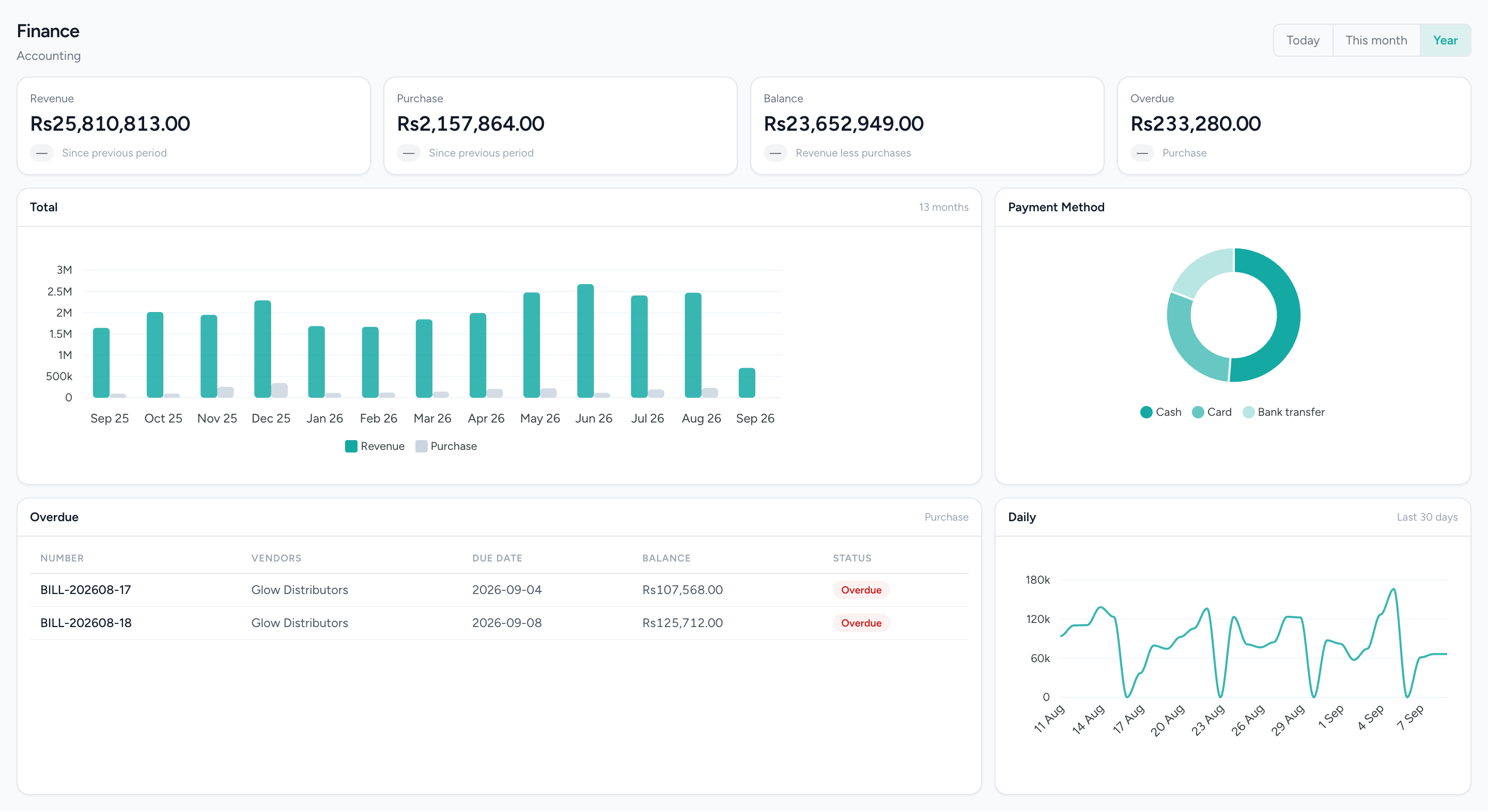
Thirteen months of revenue against supplier bills, how customers actually paid, and the bills that are late — read from the same records the till wrote.
Down to which treatment sold, and who sold it
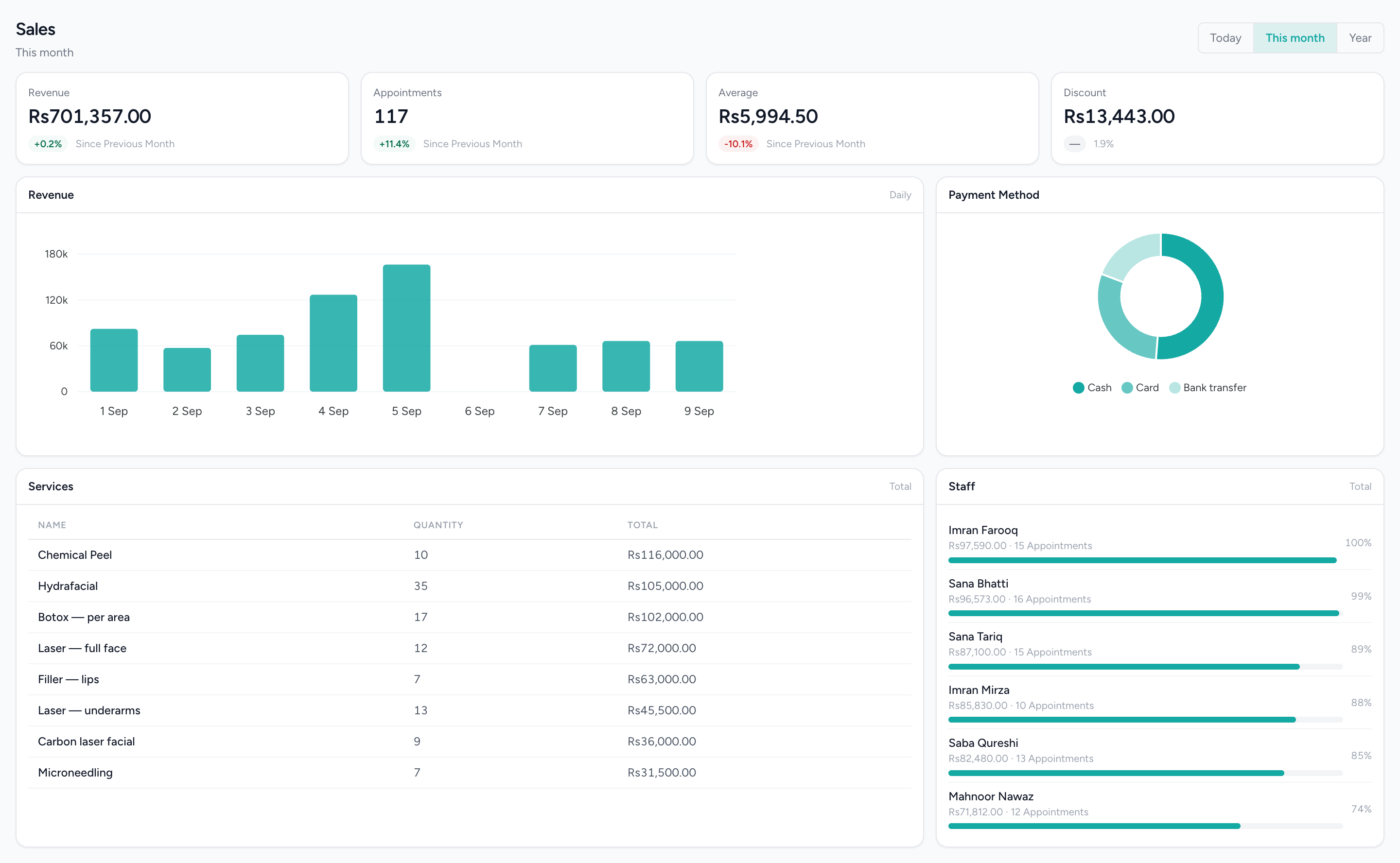
Revenue by day, the tender mix, every service ranked by what it took — and sales attributed to staff, which is attribution and not commission.
What it does not do
Worth knowing before a demo rather than after one.
- No bank reconciliation: there is no statement import or matching. Bank and cash accounts are kept from the entries you and the documents post.
- No expenses module. Spend enters through vendor bills or a manual journal voucher.
- Posting POS sales, goods-received accruals, three-way matching, delivery-note cost of sales and payroll entries are each switched on per business, not on by default.
- One ledger per business. Branch P&L is a report over it; there is no consolidation across separate businesses.
- No tax filing or e-invoicing. Output and input tax are posted and reported; nothing is submitted to any authority.
- Invoice reminders are logged, not sent.
Questions people actually ask.
The answers a decision-maker needs before booking a demo.
Do till sales go into IMFlow360's accounts automatically?
Partly. When a product is sold, its cost and stock value go into your accounts automatically. Recording the sale itself as revenue is a setting that is off by default, so a service-only appointment doesn't create an accounting entry until it's switched on. Invoices, bills, payments and credit notes always go into your accounts automatically.
Is IMFlow360 accounting real double-entry bookkeeping?
Yes. IMFlow360 has a full chart of accounts and journal entries with debits and credits, and it won't post an entry unless both sides balance. You can save an unbalanced draft while you work, but you can't post it.
Which financial reports does IMFlow360 include?
IMFlow360 includes the Trial Balance, Profit and Loss, Balance Sheet, Cash Flow and General Ledger, monthly and branch-wise Profit and Loss, customer and supplier statements, and aged receivables and payables. Every report can be printed or downloaded as PDF, Excel or CSV.
Does IMFlow360 file tax returns or e-invoices with FBR?
Not yet. IMFlow360 calculates the tax on your invoices and sales and shows it in your reports, but it doesn't file returns or send e-invoices to FBR or any provincial authority. FBR and PRA e-invoicing are in development; until then, filing stays with you or your tax adviser.
Can IMFlow360 reconcile my bank statement?
Not yet. You can keep your cash, bank and card accounts in IMFlow360 and move money between them, but there's no bank statement import or automatic matching, so reconciliation is still done by hand.
Does IMFlow360 send reminders for overdue invoices?
Not yet. You can set a reminder date on an invoice, but nothing is sent to the customer. The Aged Receivables report and customer statements show exactly who owes what and for how long, so your team knows whom to follow up.
Can my accountant use IMFlow360 without seeing the rest of the business?
Yes. Every accounting screen and action — viewing, creating, posting and exporting — has its own permission, so you can give your accountant the accounts and reports and nothing else. The business owner's Admin account always has full access.
Does IMFlow360 accounting work across branches and several businesses?
Yes. Every account, entry and report belongs to its business, Profit and Loss can be broken out by branch, and a group running several businesses keeps a separate set of books for each.
Used in these solutions
- Financial ControlYour books in the same system as your tills, closed month by month.Read more
- Order-to-CashQuote it, invoice it, get paid — and see who still owes you.Read more
- Stock & Purchasing ControlKnow what you bought, what arrived, and what you still owe for it.Read more
- Owner Visibility & ReportingFind out today, not at month end.Read more
Popular with
- RetailShelf, till and books that agree: barcode sales, stock, purchasing and cash control.Read more
- RestaurantsOrders, cash and stock that agree at close, on tills that keep working offline.Read more
- Hair SalonsBuilt around the chair — stylists, colour services and the client who asks for one by name.Read more
- Spas & WellnessRooms and therapists booked as one, with prepaid courses on the customer record.Read more
Related capabilities
- Sales & InvoicingEstimates, sales orders, invoices, credit notes and payments received, with statements and aging.Read more
- PurchasingVendors, quotations, purchase orders, goods receipts, bills and payments made.Read more
- Analytics & ReportingSales, staff and stock reports scoped to the branch you are in, and the numbers behind them.Read more
- Point of SaleOffline-capable tills that cluster over your own network, with drawer control and PIN-gated voids.Read more
Bring your books into the same system as your tills.
We will show you the module on a real dataset and tell you plainly what it does not do yet. Email sales@imflow360.com or book a walkthrough.