Find out today, not at month end
Most owners find out how the month went when the accountant tells them, six weeks later. This is the workflow for finding out on the day — and for knowing which number is takings and which is the books.
How it usually goes
The question is simple: how did we do today? The answer is a phone call to each branch, a photo of a till slip, and a figure that changes twice before dinner.
The sales report says one thing and the accountant says another, and nobody can explain why, because one was built from the drawer and the other from invoices that were raised a week later.
And the report that finally arrives is a screenshot. It cannot be sorted, it cannot be summed, and it shows every branch to whoever it was forwarded to.
From the drawer to the statement, and knowing which is which
Two kinds of number, kept apart on purpose: the operational figures the tills sync up, and the financial statements the ledger produces.
Today, not at month end
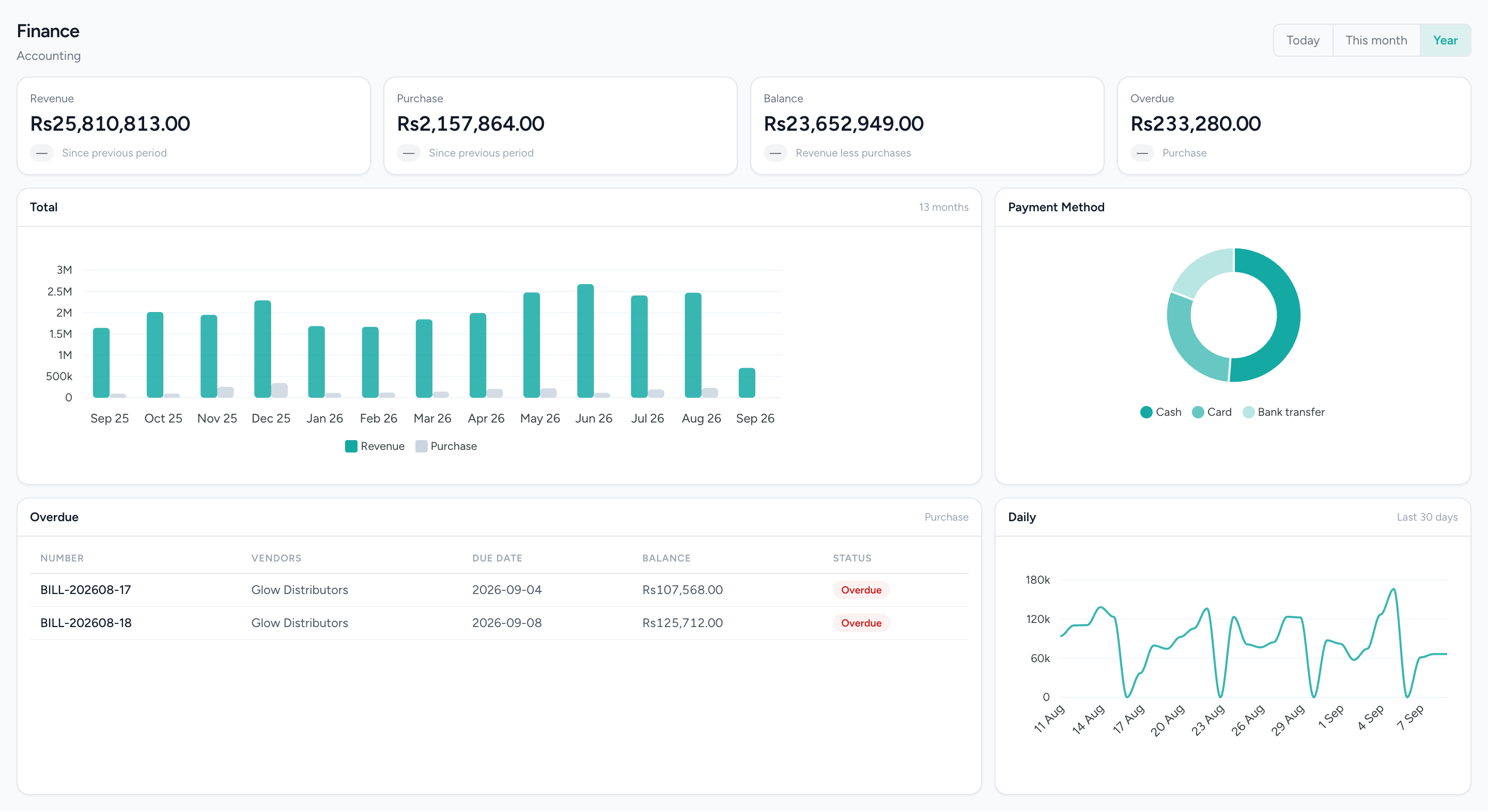
Revenue against purchases, the tender mix and the overdue bills, on the day rather than after the accountant has been.
What changes
Today, answered today
The till tells you the day as it happens; the cloud tells you the business as of the last sync. Neither depends on a phone call.
Two numbers that explain each other
The page says whether you are looking at takings or at the ledger. When the two differ, you know why — posting is switched on or it is not — rather than arguing about which is right.
A trend that is real or absent
A KPI tile never fakes a comparison. When there is nothing to compare against, it says so with a dash.
Exports that sum
Money leaves as a number, not a formatted string, and the download carries the rows on screen and no others.
Reports that respect who is asking
Permission and entitlement are checked on every report, not hidden by the menu and reachable anyway. The figure a person sees is the figure they are allowed to see.
What it does not do
Worth knowing before a demo rather than after one.
- Cloud-side dashboards and reports are not real-time. They read what has synced up from the tills; only the till’s own on-device totals are live.
- There is no single all-branches operational dashboard. Sales and appointment dashboards default to the branch you are working in; Finance’s P&L and receivables break out by branch, and low-stock and overdue-bill alerts show business-wide.
- No forecasting, anomaly detection or recommended action. Every figure is a direct read of what happened.
- The operational reports export to Excel only; PDF and CSV are Finance-module exports.
- Nobody can see which reports your team uses. There is no report-usage log in the product, so that screen was deliberately not built.
Questions about this workflow.
What owners ask before they move a live business onto a new platform.
Can I see today's sales for all branches on one screen?
Not on one combined dashboard yet. Sales dashboards show one branch at a time, and the owner's Admin account switches between branches from a menu. Profit and Loss by branch and the low-stock and overdue-bill alerts cover every branch.
What alerts does IMFlow360 give business owners?
The IMFlow360 overview shows low-stock and overdue-bill alerts across every branch, so problems stand out without opening each report.
How up to date is the IMFlow360 dashboard?
Very close to live. A sale shows on the dashboard as soon as it reaches IMFlow360, which is immediate when the till is online; sales made offline appear when that till reconnects.
Can I share reports with my accountant without giving full access?
Yes. Give your accountant a role with only the accounting screens and reports they need. Financial statements download as PDF, Excel or CSV, and sales reports as Excel.
Powered by
- Analytics & ReportingSales, staff and stock reports scoped to the branch you are in, and the numbers behind them.Read more
- Accounting & FinanceA real double-entry ledger: chart of accounts, vouchers, periods, and the statements that come off them.Read more
- Multi-LocationOne login, branch-scoped stock, staff and figures, and a P&L per location.Read more
Built for
- RetailShelf, till and books that agree: barcode sales, stock, purchasing and cash control.Read more
- RestaurantsOrders, cash and stock that agree at close, on tills that keep working offline.Read more
- Hair SalonsBuilt around the chair — stylists, colour services and the client who asks for one by name.Read more
- DentalThe business side of a practice: the diary, the front desk and the books — not the charting.Read more
See it against your own work
The dashboards, the report family, and exactly what is and is not real-time.