Run the day · Order-to-Cash
Quote it, invoice it, get paid — and see who still owes you
The sale that is not rung up at the counter — quoted first, invoiced later, paid in parts — usually lives in a spreadsheet and a folder of PDFs. IMFlow360 carries it as a chain of documents that each know the one before, and that the ledger reads directly.
How it usually goes
A quote goes out as a PDF, the customer says yes on the phone, and the order is retyped into an invoice a week later with one line different. Nobody notices until the customer queries it, and by then there is no record of which version was agreed.
Payments arrive in lumps that do not match any single invoice — a part payment here, an advance there — and the spreadsheet that says who has paid is only as current as the last time somebody sat down with the bank statement.
Asked who owes the business money and for how long, the honest answer is a day's work. The accountant asks the same question at year end and gets a different figure, because the spreadsheet and the books were never the same thing.
From the first quote to the cleared balance
Each document is a real record with its own number, status and history. The ones that move money post to the ledger the moment they are issued; the ones that do not are said to be working documents.
- Sales & Invoicing
Estimate
A priced offer with a validity, raised in Sales & Invoicing against the customer record. It is a working document and does not post to the ledger.
- Sales & Invoicing
Sales order
Accept the estimate and it becomes a sales order without a line being re-keyed. Still a working document, and the same kind of record an IMBeautyGlow order is created as — a quoted order and a web order sit in the same list.
- Sales & Invoicing
Invoice, or cash invoice
A sale invoice raised from the order, with terms and a due date, posts receivables against the customer, revenue per line and output tax as it is issued. Where the sale is invoiced and paid in one step, a cash invoice posts revenue and tax and the payment against it.
- Sales & Invoicing
Payment received, allocated
Record what came in and allocate it in Sales & Invoicing across open invoices, an opening balance, an advance or a reimbursement. It posts to the deposit account and clears receivables; an unallocated remainder stays visible until it is applied.
- Sales & Invoicing
Credit note, if something comes back
An item returned or a discount after the fact is a credit note, approved before it posts. Approval reverses revenue and tax and reduces what the customer owes; nothing is edited on the original invoice.
- Sales & Invoicing
Statement and aging
The Customer Statement of Account and Aged Receivables — 0–15, 16–30, 31–45, 46–60 and 60+ days — are read from the ledger in Accounting & Finance, filterable by branch. Cash invoices are settled by definition and left out of aging.
- Sales & Invoicing
The ledger, already written
Because the invoice, the cash invoice, the credit note and the payment each wrote their own entry, the trial balance, profit and loss and balance sheet in Accounting & Finance already carry the sale. There is no separate bookkeeping step.
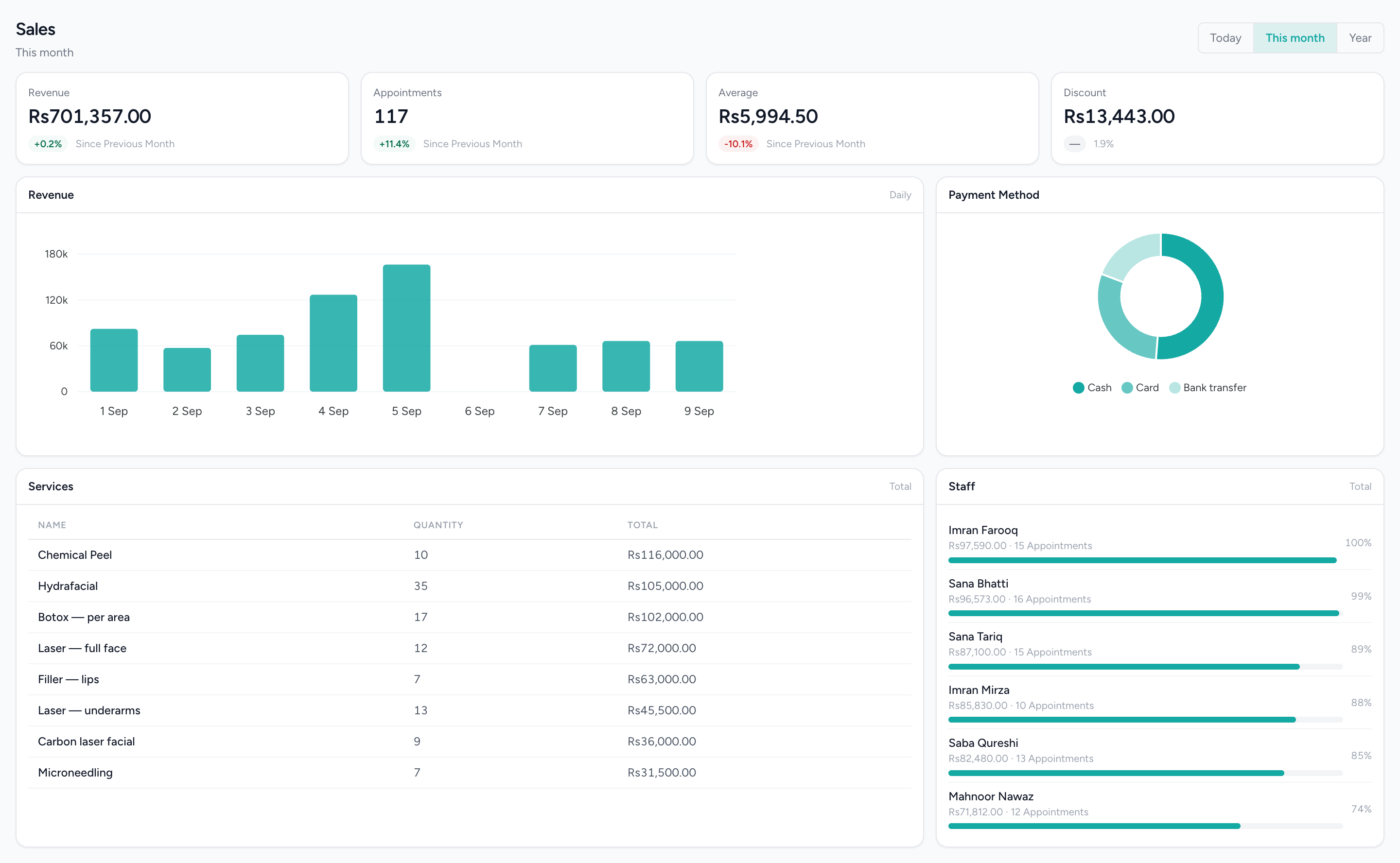
What sold, and how it was paid
Revenue for the period, the tender mix and the top lines — the figures the invoices, cash invoices and payments received feed.
What changes
One chain, not four retypings
The estimate becomes the order becomes the invoice, each keeping its own number and history. The line the customer agreed is the line that is invoiced.
Receivables are a report, not a reconstruction
Who owes what, and for how long, comes off the ledger in aging buckets and a statement per customer — the same figure your accountant sees, because it is the same books.
A payment lands where it belongs
A lump sum is allocated across the invoices it covers, an advance is held against the customer until the invoice exists, and the unallocated remainder stays visible rather than disappearing into a total.
Returns leave a clean trail
A credit note reverses the revenue, the tax and the balance owed, with an approval step before it does. The original invoice is never edited.
Counter and back office share the customer
The customer on the invoice is the same record the till and the diary use, so a client who pays at the counter one week and on account the next has one history and one balance in Customers.
Invoices that recur as drafts
A recurring template raises the next invoice on schedule as a draft, reviewed before it goes out rather than issued on autopilot.
What it does not do
Worth knowing before a demo rather than after one.
- Estimates and sales orders do not post to the ledger. They are working documents; the invoice raised from them is what posts.
- Invoice reminders are logged, not sent. A schedule on an invoice records that a reminder fell due; no email or message goes out, so chasing is still a person's job.
- There is no online payment link on an invoice. Online payment is available when clients book or shop on IMBeautyGlow, through PayFast where the business has switched it on — not on an issued invoice.
- A payment recorded directly on an invoice, rather than through Payments Received, does not post its own entry. Use Payments Received for the ledger to follow.
- There is no bank reconciliation: no statement import and no matching. Bank and cash accounts are kept from the entries the documents post, and there is no tax filing or e-invoicing.
Questions about this workflow.
What owners ask before they move a live business onto a new platform.
Can I take an advance payment before the invoice is ready?
Yes. Record the payment in IMFlow360 as an advance against the customer, and when the invoice is raised the advance is applied to it. Until then, the unused amount stays visible on the customer's account.
What happens when a customer returns part of an order?
Raise a credit note in IMFlow360. Once it's approved, it reverses the sale and the tax for the returned items and reduces what the customer owes, while the original invoice stays unchanged for your records.
Does IMFlow360 match bank payments to invoices automatically?
Not yet. There's no bank statement import or automatic matching. You record each payment in IMFlow360 and choose the invoices it covers, and the bank balance in your accounts is kept from those entries.
Powered by
- Sales & InvoicingEstimates, sales orders, invoices, credit notes and payments received, with statements and aging.Read more
- CustomersOne record per customer: every visit, order, package and rating against it.Read more
- Accounting & FinanceA real double-entry ledger: chart of accounts, vouchers, periods, and the statements that come off them.Read more
- Analytics & ReportingSales, staff and stock reports scoped to the branch you are in, and the numbers behind them.Read more
Built for
- Bridal & MakeupOne job with many people, many dates and money arriving over months.Read more
- Aesthetic ClinicsCourses of treatment across several visits, with the room and the practitioner booked together.Read more
- RetailShelf, till and books that agree: barcode sales, stock, purchasing and cash control.Read more
- Appointment BusinessesAnything whose day is a diary — clinics, studios, tutors, workshops.Read more
See it against your own work
Every document in the chain, what each one posts, and the statements and aging that come off them.