Know what you bought, what arrived, and what you still owe for it
Stock drifts when things arrive or leave without a record, and suppliers get paid on a bill nobody checked against the delivery. This is the chain that gives each of those steps a document, and keeps the shelf, the cost and the ledger reading from the same one.
How it usually goes
The count on the system and the count on the shelf disagree, and nobody can say when they parted company. A delivery was signed for and shelved, but the paperwork went in a drawer, so the system still thinks the stock is on a truck.
Supplier bills arrive by email and are paid from the bill, because the bill is what is in front of you. Whether the quantities on it match what was ordered — or what turned up — is a question that gets asked once a year, if at all.
And what a product actually cost you is the last price somebody remembers, which is why the margin figure changes depending on who is asked. When two branches run out of the same item, one is over-ordering and the other is borrowing, and neither shows in a report.
From reorder point to settled bill
Every step is its own document with its own approval, so nothing is bought, received or paid on a verbal — and each one updates the stock count, the cost or the ledger as it goes.
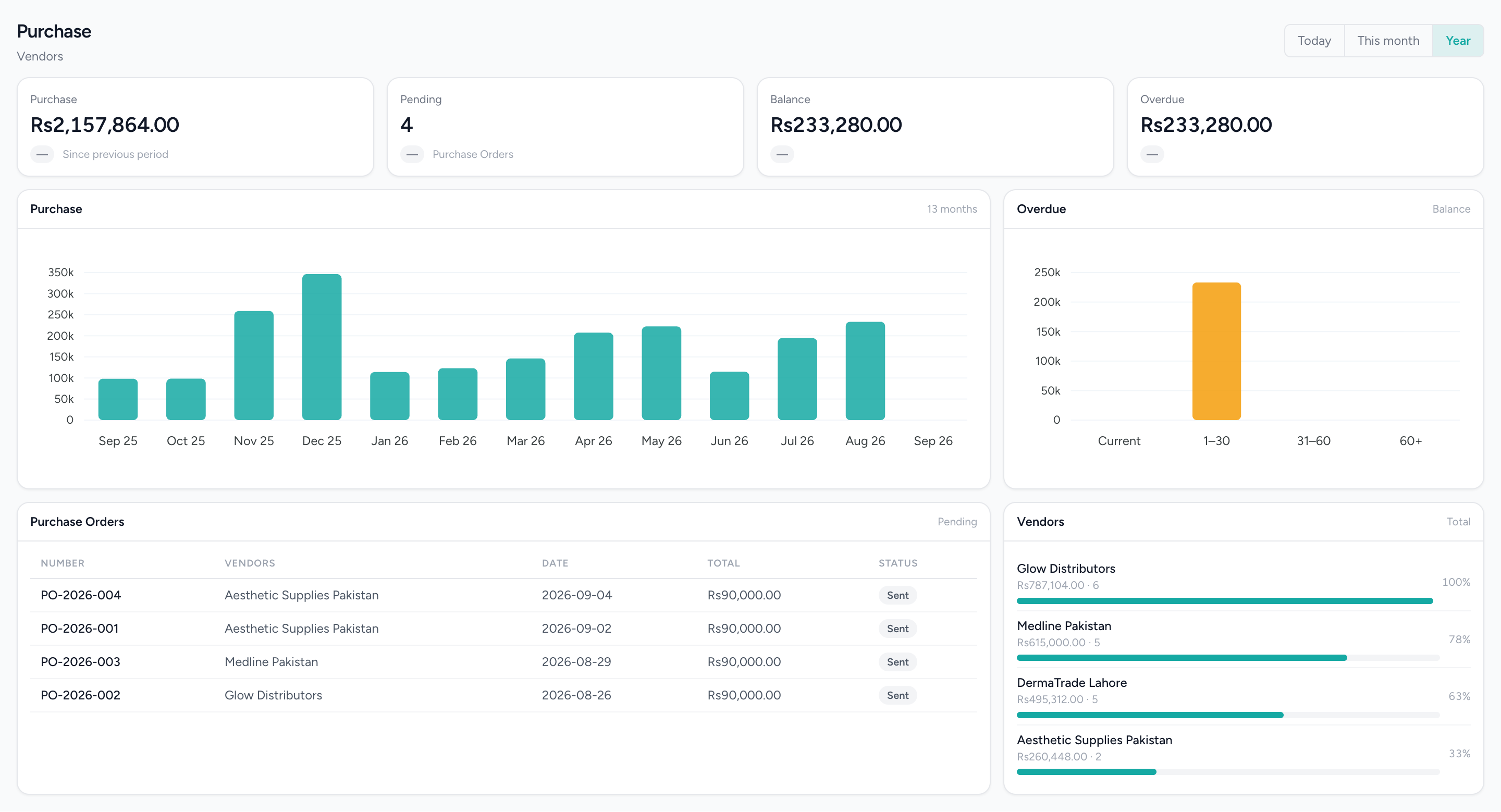
What you owe, and for what
Supplier spend, open orders and the balance aged into buckets, so the overdue column is not one number you have to trust.
What changes
Stock arrives with a record
Goods received are booked against the purchase order rather than typed in, and wastage is a recorded movement rather than a silent adjustment. Most drift comes from stock arriving or leaving without a record, so both now have one, and every change is attributable.
A cost you did not have to remember
Each receipt updates a moving average cost per item and branch. That figure is what the stock valuation and cost of sales read, so the margin on a report is the margin, not an estimate that depends on who was asked.
Bills that were checked before they were paid
The bill is a document with an approval, matched to the order and the receipt. Where the business turns three-way matching on, a quantity that does not agree is shown at approval rather than discovered at year end.
Payables you can age
Every bill, debit note and payment sits against the vendor, so the statement and the aged payables are read from the documents. Overdue bills are also one of the alerts shown across every branch.
Each branch keeps its own shelf
On-hand quantity is tracked per branch, and per warehouse within it. One location selling through its stock does not draw down another, and moving stock between branches is a recorded transfer rather than an assumption.
A product list that comes across in one go
A spreadsheet importer with a template validates the whole file and previews it before anything is written. Variants — size, colour, anything you define — each carry their own SKU, barcode, price and stock level, and a barcode cannot be on two things at once.
What it does not do
Worth knowing before a demo rather than after one.
- Three-way matching and goods-received-not-invoiced accrual are switched on per business. The default is to receive and post against the bill.
- Moving average cost only. There is no FIFO, no landed-cost calculation and no purchase-price variance account.
- Cancelling an approved bill does not reverse its ledger entry — raise a debit note.
- The stock deduction for a till sale happens in the cloud when the order syncs, not on the terminal, and a refund at the till does not put the item back on the shelf. Purchase orders, goods receipts and stock adjustments are in the web back office, not on the till.
- A purchase order is a document you send; nothing is transmitted to a supplier system. There is no recipe or ingredient costing, and no weighed items.
Questions about this workflow.
What owners ask before they move a live business onto a new platform.
Can I create a purchase order from the till when stock runs low?
Not from the till. Purchase orders, deliveries and stock adjustments are done in your IMFlow360 dashboard, where the stock dashboard's reorder list shows what's running low so you can order from there.
Do I have to record a goods receipt before approving a supplier bill?
No, not by default: most businesses receive stock and approve the bill in one step. If you want a separate goods receipt and three-way matching of order, receipt and bill, both can be switched on for your business.
If I buy the same item at two different prices, which cost does IMFlow360 use?
The weighted average. IMFlow360 blends the prices into one average cost per item at each branch, updated with every delivery, and uses it for stock value and profit. It doesn't use FIFO or add freight costs.
Can IMFlow360 cost a dish or treatment from its ingredients?
Not yet. IMFlow360 doesn't do recipe or ingredient costing, and selling a service doesn't reduce the products used to deliver it. Stock is costed and counted item by item.
Powered by
- InventoryStock that moves when a sale syncs, with goods received, transfers and reorder points.Read more
- PurchasingVendors, quotations, purchase orders, goods receipts, bills and payments made.Read more
- Multi-LocationOne login, branch-scoped stock, staff and figures, and a P&L per location.Read more
- Accounting & FinanceA real double-entry ledger: chart of accounts, vouchers, periods, and the statements that come off them.Read more
Built for
- RetailShelf, till and books that agree: barcode sales, stock, purchasing and cash control.Read more
- GroceryHigh-volume barcode selling with purchasing, transfers and reorder points behind it.Read more
- RestaurantsOrders, cash and stock that agree at close, on tills that keep working offline.Read more
- Hair SalonsBuilt around the chair — stylists, colour services and the client who asks for one by name.Read more
See it against your own work
Products and variants, reorder points, multi-branch stock and transfers, and the stock dashboard in full.