Know every customer the second time as well as the first
The second visit is where a salon or clinic makes its money, and it is the visit most systems know nothing about. This is the workflow that carries what you learned the first time into the next one.
How it usually goes
The customer who came in three months ago is a name in the appointment book and nothing else. Which stylist she saw, what she was allergic to, whether she was happy — that lives in the memory of whoever served her, and that person may have left.
Prepaid deals are sold on a handwritten card. Nobody can say how many sessions are left, and when the card is lost the argument at the counter costs more than the sessions were worth.
And when a customer does come back, the front desk starts from a blank record. The same questions are asked, the same preference is missed, and the visit that should have been easier is not.
From the first visit to the next one
Everything below reads and writes the same customer record — the counter, the booking flow, the storefront and the accounts module all point at one row.
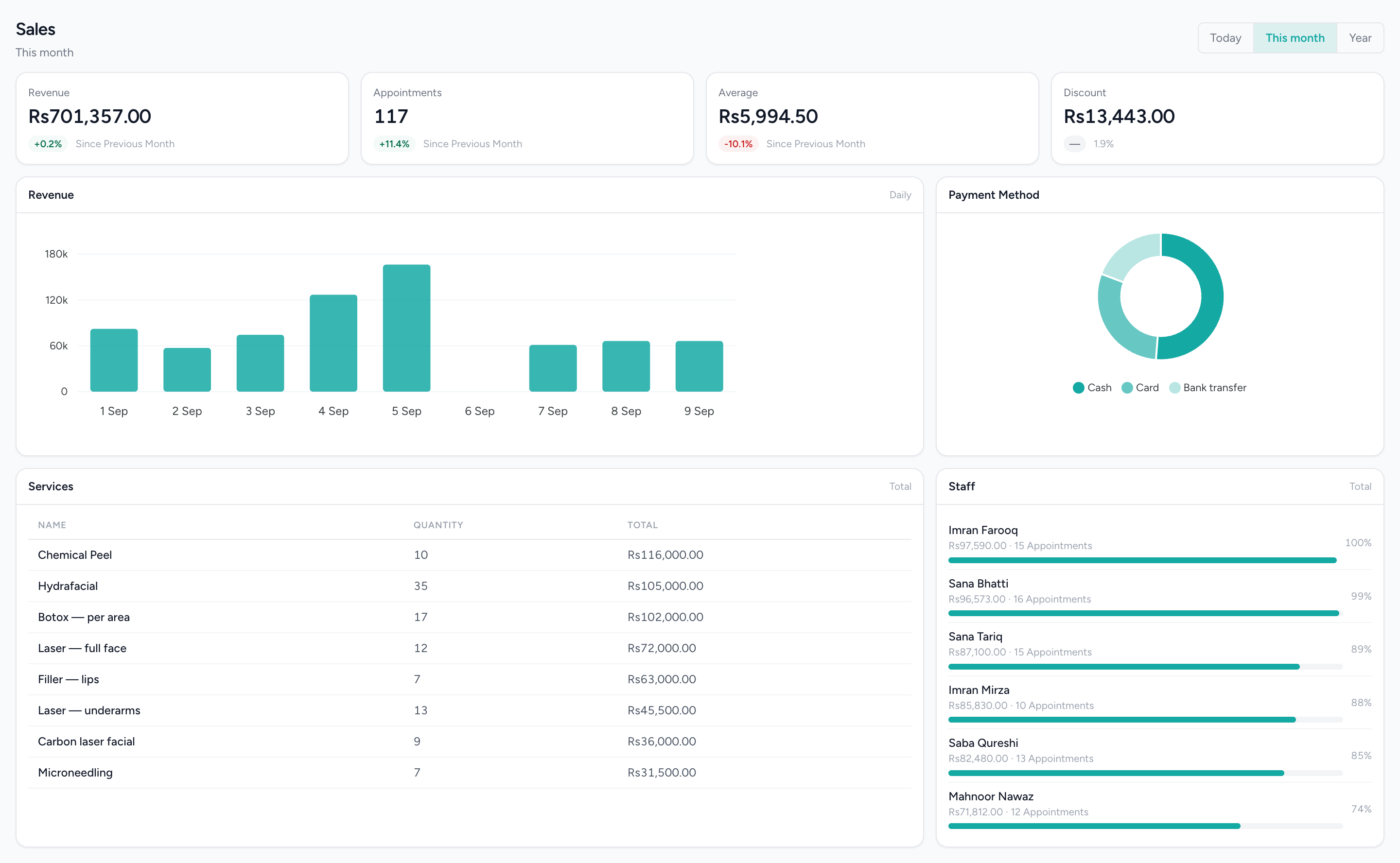
What each customer came back for
Services ranked by what they took and sales by staff member — the pattern behind the second visit.
What changes
The second visit starts informed
The record the front desk opens already says what the guest is allergic to, what they bought, who served them and what they thought. The questions that were asked last time are not asked again.
Packages that count themselves
Sessions left and the expiry date are on the record, drawn down as bookings are made against the package. The handwritten card and the argument about it are gone.
Ratings you can act on, per person
A rating for the business and one for each person on the ticket, kept against the visit. When a stylist’s scores drop, you see it against the orders that produced them.
Customers grouped your way
A many-to-many grouping you manage yourself — bridal clients, regulars, corporate accounts — for targeting or reporting, rather than a rule guessing who belongs where.
Online and in the chair, one person
A customer who books through IMBeautyGlow, saves your salon or wishlists a product from the storefront is the same record the counter serves. The history does not split by channel.
What it does not do
Worth knowing before a demo rather than after one.
- No loyalty. There are no points, rewards or tiers, and the reward balance the customer account exposes is reported as unavailable rather than shown as a number that was never earned. A package is a prepaid bundle of sessions with an expiry, and that is all it is.
- No campaigns and no automation. Nothing messages a customer because of their history, their spend or how long it has been since they visited. The reminder and the thank-you are the only messages that go out, and they go by email — there is no SMS channel and no WhatsApp sending in this product.
- No notes on a customer profile. Preferences are carried as tags; there is no free-text note a receptionist can leave for the next person.
- Groups are lists you build by hand. There is no behaviour-based segmentation and no rule that adds a customer to a group for you.
Questions about this workflow.
What owners ask before they move a live business onto a new platform.
Can IMFlow360 send win-back offers to clients who haven't visited in a while?
Not yet. IMFlow360 doesn't send campaigns or automatic messages based on visit history, and it has no SMS or WhatsApp sending. You can group clients, create offers and coupon codes, and contact them through your own channels.
How do prepaid packages work in IMFlow360?
A package is a bundle of sessions sold at one price with an expiry date, on the till or through IMBeautyGlow. Booking a package online creates one appointment at the package price. IMFlow360 doesn't count down the remaining sessions yet, so your team keeps track of them.
How do client ratings work in IMFlow360?
At the end of each visit, clients rate the business and each staff member who served them on the customer display. Ratings are saved against that visit, so each one is linked to the stylist and the service it was for.
Does a client who books online end up with a second profile?
No. Bookings made on IMBeautyGlow, products saved to a wishlist and sales rung up at the till all belong to the same IMFlow360 client profile, so their history and allergies follow them whichever way they come in.
Powered by
- CustomersOne record per customer: every visit, order, package and rating against it.Read more
- AppointmentsA diary that knows service duration, leave and clashes before they happen.Read more
- Analytics & ReportingSales, staff and stock reports scoped to the branch you are in, and the numbers behind them.Read more
Built for
- Hair SalonsBuilt around the chair — stylists, colour services and the client who asks for one by name.Read more
- Spas & WellnessRooms and therapists booked as one, with prepaid courses on the customer record.Read more
- Aesthetic ClinicsCourses of treatment across several visits, with the room and the practitioner booked together.Read more
- DentalThe business side of a practice: the diary, the front desk and the books — not the charting.Read more
- RetailShelf, till and books that agree: barcode sales, stock, purchasing and cash control.Read more
See it against your own work
The customer record in full: what hangs off it, how tags are kept, and where ratings and packages sit.