Know what’s selling before you run out.
Stock moves the moment a sale is rung up — across counters, branches and channels. Purchases, goods received, transfers and reorder points live in the same place the till does.
A sale is not the end of the story.
One checkout moves five things. This is the connection a standalone POS does not make.
Everything stock control asks of you.
Built for businesses that carry retail alongside services, and for those that carry nothing else.
Products and variants
Barcodes, in-store codes, and size and colour variants.
Learn morePurchasing and GRN
Raise purchase orders, receive against them, handle short deliveries and returns.
Learn moreMulti-branch stock
Separate quantities per location with transfers, and one consolidated view above them.
Learn moreReorder points and alerts
Set a floor per product per branch and get told before the shelf is empty, not after.
Learn moreCounts and adjustments
Cycle counts, full stocktakes, wastage and adjustments — every change with a reason and a name.
Learn moreStock reporting
Valuation, turnover, dead stock and margin by product, category, branch or supplier.
Learn moreConnected to the rest of the platform.
Inventory is not a separate app with its own login and its own version of the truth.
Every sale writes the stock movement as it writes the receipt.
Online availability comes from the same quantity the shop floor sees.
Cost of goods lands beside the takings in the day close.
Move stock between branches without leaving the platform.
Margin reporting reads the purchase cost, not an estimate.
Questions owners ask.
The answers a decision-maker needs before booking a demo.
Does IMFlow360 keep stock up to date when the internet is down?
Yes. Sales made offline are saved on the till, and your stock count updates as soon as the till reconnects, so nothing is missed. Stock counts, deliveries and adjustments are done in your IMFlow360 dashboard.
How do I bring my existing product list into IMFlow360?
Use the spreadsheet importer. Download the template and fill it in; IMFlow360 checks the whole file and shows a preview before anything is saved, so mistakes are caught first. Imported items become stock items, and you choose which ones to sell as products.
Does IMFlow360 support product variants like size and colour?
Yes. Each variant — size, colour or any option you define — has its own SKU, barcode, price and stock level. IMFlow360 checks that no barcode is used twice across your products and variants.
How does IMFlow360 keep stock counts accurate?
By recording every movement. Deliveries are received against a purchase order, wastage is recorded as its own movement rather than a quiet correction, and every change shows who made it. Most count errors come from stock arriving or leaving without a record, so IMFlow360 records both.
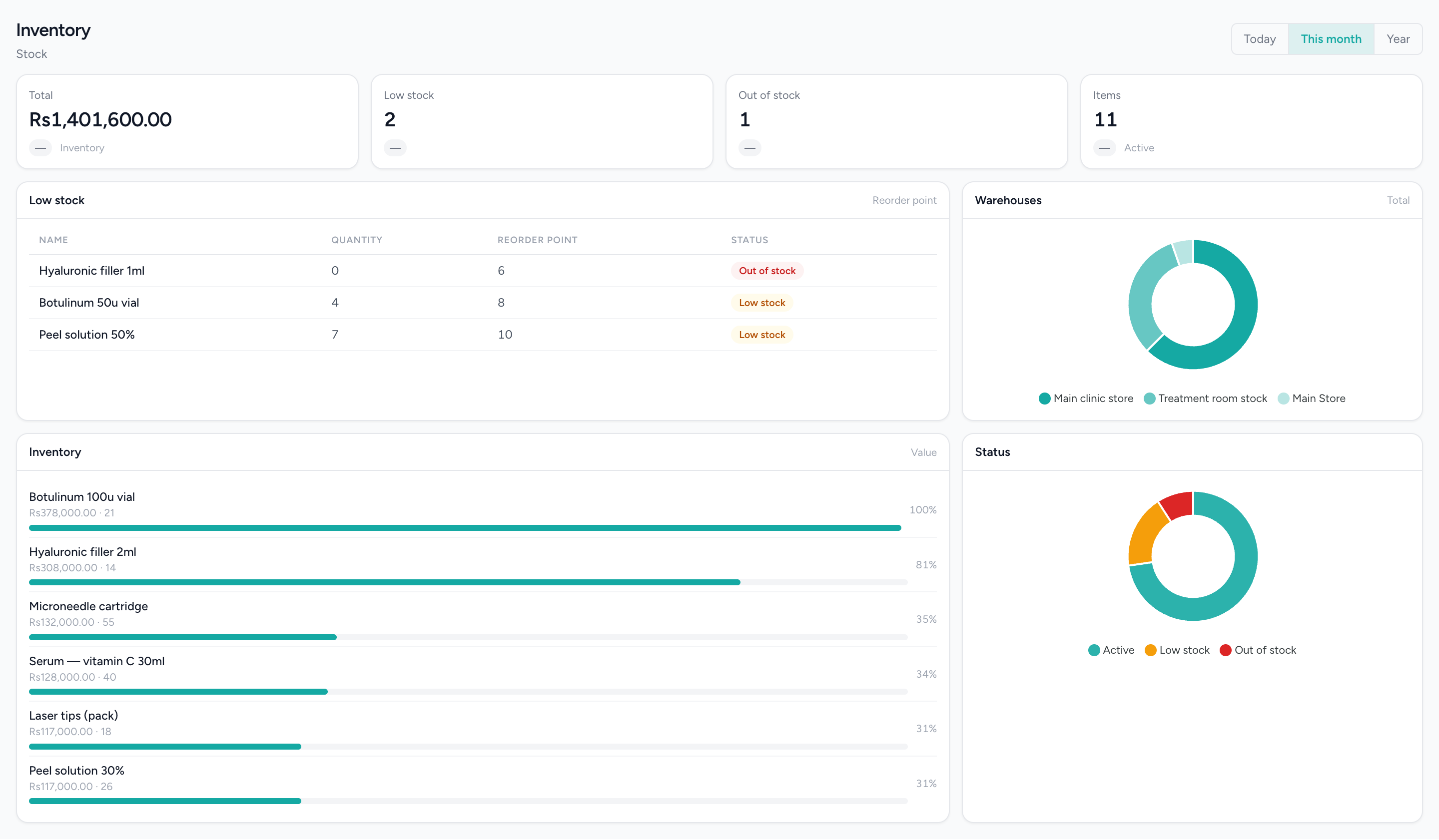
What is running out, before it runs out
Every consumable valued at cost, with the reorder list first — because the only stock figure anybody acts on is the one that says buy this now.
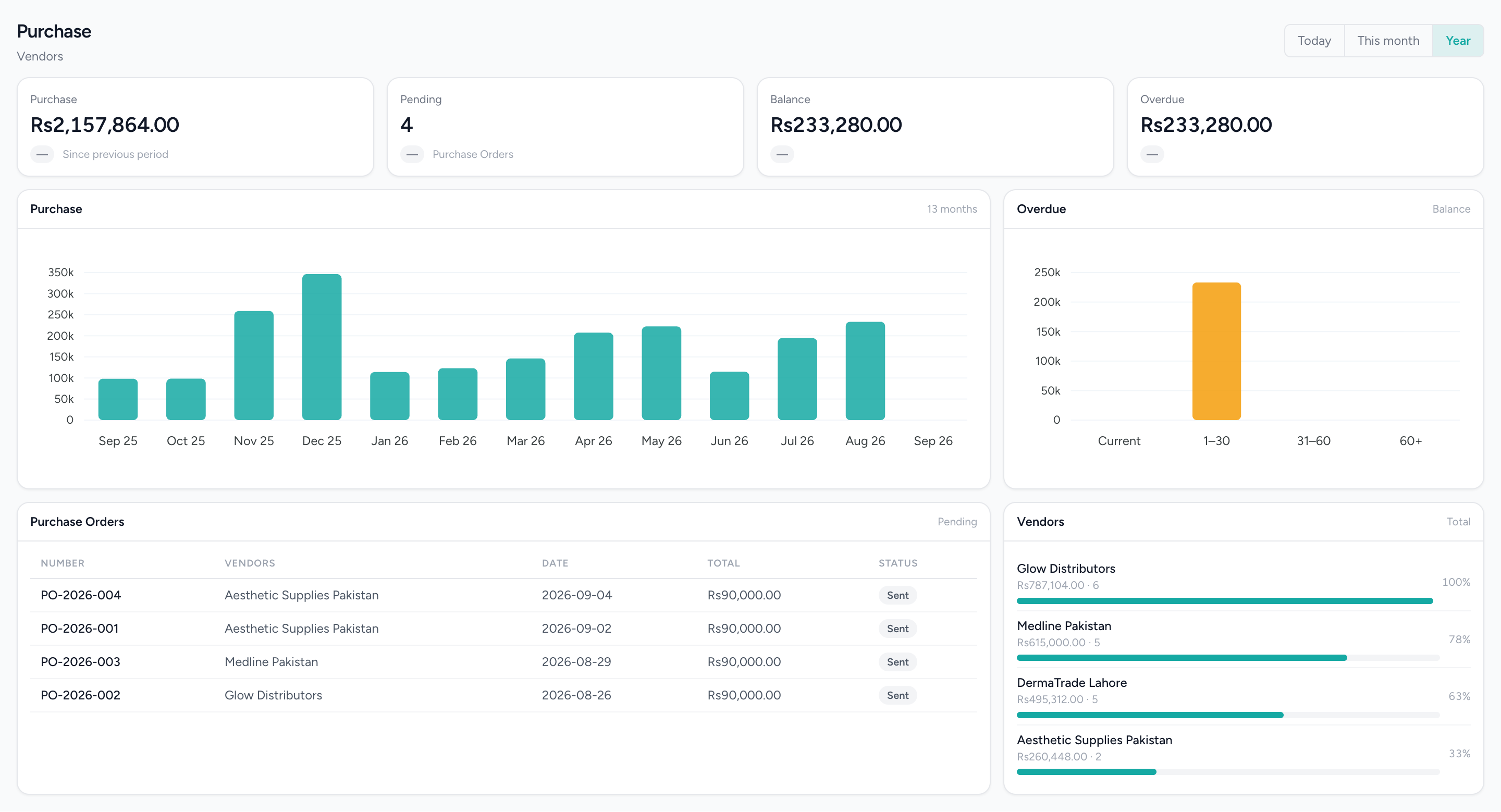
And the other half of it — what you owe your suppliers
Thirteen months of supplier spend, open orders, and the balance aged into buckets so the overdue column is not a single number you have to trust.
Popular with
- RetailShelf, till and books that agree: barcode sales, stock, purchasing and cash control.Read more
- GroceryHigh-volume barcode selling with purchasing, transfers and reorder points behind it.Read more
- RestaurantsOrders, cash and stock that agree at close, on tills that keep working offline.Read more
- Hair SalonsBuilt around the chair — stylists, colour services and the client who asks for one by name.Read more
Related capabilities
- PurchasingVendors, quotations, purchase orders, goods receipts, bills and payments made.Read more
- Point of SaleOffline-capable tills that cluster over your own network, with drawer control and PIN-gated voids.Read more
- Multi-LocationOne login, branch-scoped stock, staff and figures, and a P&L per location.Read more
- CommerceOnline booking and shopping through IMBeautyGlow.Read more