Sales & Invoicing
The till handles the sale that happens across the counter. This is the rest of selling: the quote that becomes an order, the invoice raised on it, the credit note when something comes back, the payment that clears it, and the statement that shows what is still owed.
The documents, and what each one does
Every document is a real record with its own numbering, status and history. The ones that move money post to the ledger; the ones that do not, say so here.
- Estimatedoes not post
- Sales orderdoes not post
- Invoiceposts on issue
- Credit noteposts on approval
- Payment receivedposts, allocated
Estimate to sales order
An estimate is a priced offer with a validity; accept it and it becomes a sales order without re-keying a line. Neither posts to the ledger — they are working documents. The order is what IMBeautyGlow creates too, so a web order and a quoted one sit in the same list.
Sale invoices, on credit
Raised from an order or on their own, with terms and a due date. Issuing an invoice posts receivables against the customer, revenue per line, and output tax. Delete one and the entry is reversed rather than left dangling.
Cash invoices, settled as they are raised
For the sale that is invoiced and paid in one step. The invoice posts revenue and tax; the payment recorded against it posts to the account the money went into.
Credit notes that reverse the right thing
Two kinds — an item returned, or a discount after the fact — approved before they post. Approval reverses revenue and tax and reduces what the customer owes; nothing is edited on the original invoice.
Payments received, allocated where they belong
Record what came in and allocate it across open invoices, an opening balance, an advance or a reimbursement. The payment posts to the deposit account and clears receivables; an unallocated remainder stays visible until it is applied.
Recurring invoices, generated as drafts
A template raises the next invoice on schedule as a draft, so it is reviewed before it goes out rather than sent on autopilot.
Delivery notes
A goods-delivered note against a sales order records what left the building. Posting cost of sales from it is a mode a business switches on; by default the note is a record, not an entry.
Statements and aging, per customer and per branch
Customer Statement of Account and Aged Receivables (0-15, 16-30, 31-45, 46-60, 60+ days), payment allocation and a sales report, filterable by branch. Aging counts credit invoices; cash invoices are settled by definition and are left out.
One customer, one balance
The customer here is the same record the till and the diary use, and the balance on the statement is read from the ledger — not a separate figure kept by the sales module.
What sold, and who owes for it
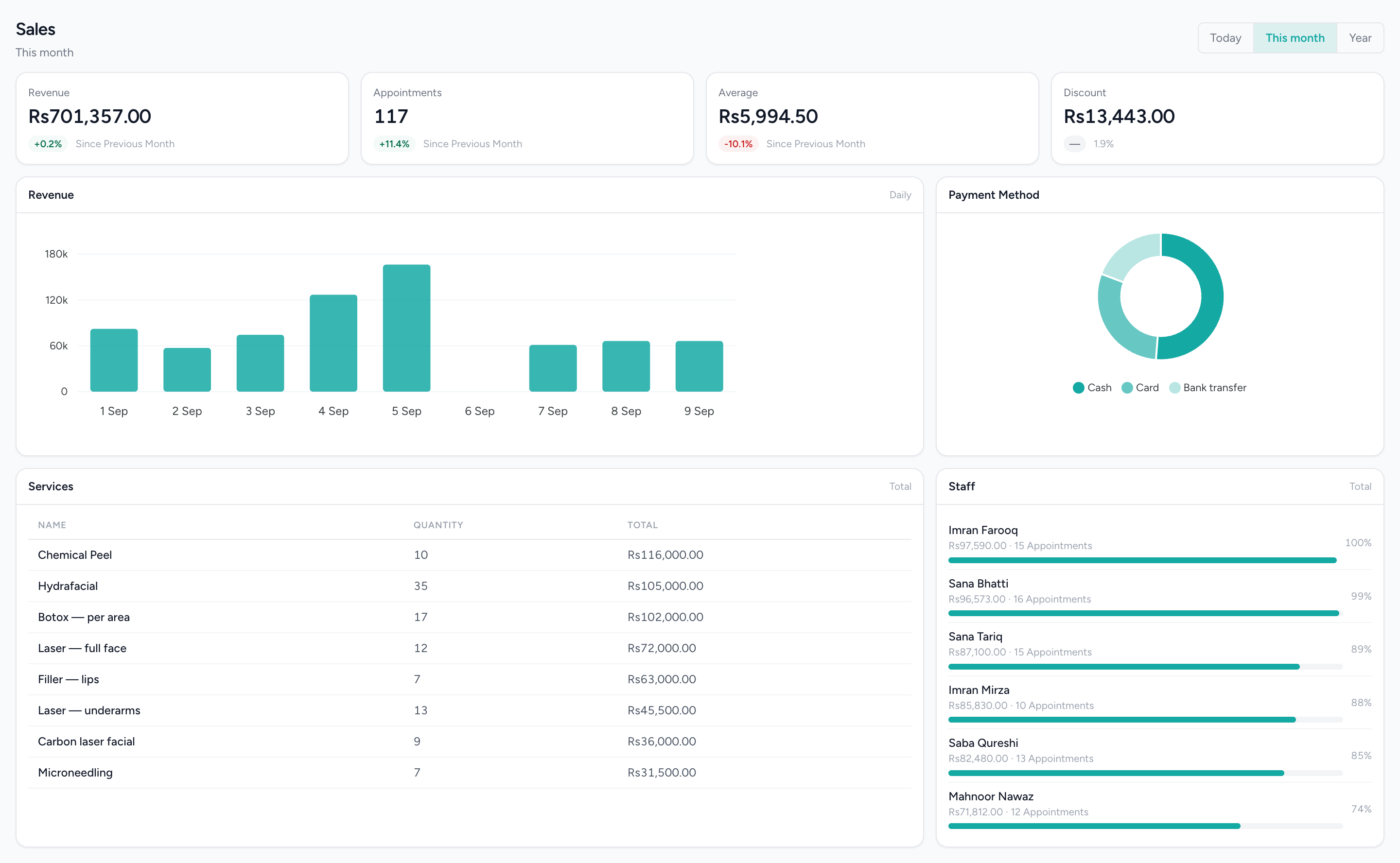
Revenue by day, the tender mix, every service ranked by what it took — the same sales figures the invoices and cash invoices feed, read from the same records the till wrote.
What it does not do
Worth knowing before a demo rather than after one.
- Invoice reminders are logged, not sent. There is no email or message going out on a due date today.
- No online payment link on an invoice. Online payment is available when clients book or shop on IMBeautyGlow, through PayFast where the business has switched it on — not on an issued invoice.
- Estimates and sales orders do not post to the ledger; the invoice raised from them does.
- No sales-tax return. Output tax is posted and appears in the ledger reports; there is no filing.
- A payment recorded directly on an invoice, rather than through Payments Received, does not post its own entry — use Payments Received for the ledger to follow.
Questions people actually ask.
The answers a decision-maker needs before booking a demo.
Which sales documents go into the accounts in IMFlow360?
Sales invoices, cash invoices, approved credit notes and payments received go into your accounts automatically. Quotations and sales orders are working documents and don't; the invoice raised from them does.
Can customers pay an IMFlow360 invoice online?
Not yet. Invoices don't carry a payment link today; you record payments against them in IMFlow360. Online payment is available when clients book or shop through IMBeautyGlow, for businesses that switch it on.
Do online orders appear with my other sales orders?
Yes. An order placed on IMBeautyGlow arrives in IMFlow360 as a sales order in the same list as your quoted orders, and once it's paid online it's confirmed and sent to the till.
How does IMFlow360 work out what a customer owes?
From your accounts. Customer statements and the Aged Receivables report read the same accounting entries, so the balance on a statement always matches your books. Ageing counts credit invoices only; cash invoices are settled when they're raised.
Popular with
- Bridal & MakeupOne job with many people, many dates and money arriving over months.Read more
- Aesthetic ClinicsCourses of treatment across several visits, with the room and the practitioner booked together.Read more
- RetailShelf, till and books that agree: barcode sales, stock, purchasing and cash control.Read more
- Appointment BusinessesAnything whose day is a diary — clinics, studios, tutors, workshops.Read more
Related capabilities
- Accounting & FinanceA real double-entry ledger: chart of accounts, vouchers, periods, and the statements that come off them.Read more
- CustomersOne record per customer: every visit, order, package and rating against it.Read more
- Analytics & ReportingSales, staff and stock reports scoped to the branch you are in, and the numbers behind them.Read more
- PurchasingVendors, quotations, purchase orders, goods receipts, bills and payments made.Read more
Quote it, invoice it, and know who still owes you — in the same books as the till.
We will show you the module on a real dataset and tell you plainly what it does not do yet. Email sales@imflow360.com or book a walkthrough.