Retail that reconciles: shelf, till and books
A shop is a shelf, a till, a supplier and a set of books, and the usual problem is that each keeps its own figure. IMFlow360 keeps one: the product sold at the counter is the one the purchase order restocks and the one the ledger costs.
What goes wrong in a shop that runs on four figures
The count on the system is not the count on the shelf
A delivery was signed for and shelved but the paperwork went in a drawer, so the system still thinks the stock is on a truck. Wastage leaves without a record. By stock-take, nobody can say when the two figures parted company.
The drawer is short, with four explanations
The float was whatever was left last night, somebody took cash out for change, and a refund was given by someone who has since gone home. A void is an order that disappeared.
Nobody knows what it actually cost
The cost of a product is the last price somebody remembers, so the margin changes depending on who is asked. Supplier bills are paid from the bill, not checked against what was ordered or what arrived.
The internet goes and the queue stands there
The till was a browser tab. Sales made while the router restarts are written on a pad to be typed in later, or twice, or not at all.
Two branches, no comparison
One branch over-orders what the other is short of, and the owner finds out which branch made money when the accountant does — months later.
Where IMFlow360 fits a shop
IMFlow360 runs the whole loop of a shop with stock: a till that keeps selling when the internet does not and shares one trading day across several counters over the shop's own network; an inventory with variants, reorder points and per-branch quantities; the purchasing chain from quotation to settled bill; and a general ledger that costs each sale at the moving average the receipts built.
The counter is a tablet app with a database of its own — catalogue, prices, taxes, staff, PINs and the customer book — and any USB or Bluetooth scanner that types what it reads. It records how each customer paid; it does not authorise cards. The drawer opens on a counted float and closes on a counted one, with voids, refunds and discounts behind a manager PIN.
A trade customer who buys on account is served from the back office rather than the till: an estimate that becomes a sales order, an invoice with terms, and payments received allocated against it, with a statement and aging per customer. The retail sale and the trade sale meet in the same books.
A day in the shop on IMFlow360
From the float counted at opening to the branch profit and loss, each step names the part of the platform that does it.
- Step 1
Open the drawer on a counted float
Each counter opens its drawer in Point of Sale on the float carried over from last night's close, plus anything added. Staff sign in with a six-digit PIN checked on the device, so opening takes the same time whether the connection is up or not.
Point of Sale - Step 2
Scan and sell
A USB or Bluetooth scanner types the barcode into the order screen in Point of Sale — no driver, no pairing screen — and a code the shop does not stock is refused rather than added as a mystery line. The customer is looked up in the customer book on the terminal or created once, with a mobile number.
Customers - Step 3
Take the money
Cash with the change owed, or a card or wallet payment taken on the shop's own machine, each recorded against the order as its own line. The customer watches the order build on the customer display, adds a tip if they wish and leaves a rating. The receipt is on screen and can be reopened from the order list.
Customers - Step 4
Let the stock and the cost follow
The order goes up when the connection allows, once, matched on its own identifier. The stock deduction happens in Inventory as the order syncs, and cost of sales posts to Accounting & Finance at the moving average for that item and branch.
Accounting & Finance - Step 5
Invoice the trade customer
A wholesale or corporate buyer is quoted, ordered and invoiced in Sales & Invoicing; the invoice posts receivables and revenue as it is issued, and a payment received is allocated across whatever it covers. Aged Receivables shows who is late.
Sales & Invoicing - Step 6
Reorder what the shelf says to
A reorder point per product, per branch, puts the item on the reorder list in Inventory. A purchase order is raised in Purchasing, the delivery is booked against it as a goods receipt — in full or in part — and the vendor bill is approved against both, posting stock and payables. Stock for another branch moves as a recorded transfer.
Purchasing - Step 7
Close the day, then read the branch
Each drawer is counted against the expected figure with the variance shown as you type; a day with open orders will not close until they are settled or a manager forces it. Once the day has synced, the sales, staff and stock reports in Analytics & Reporting carry it, and the profit and loss by branch in Accounting & Finance says which shop made money.
Accounting & Finance
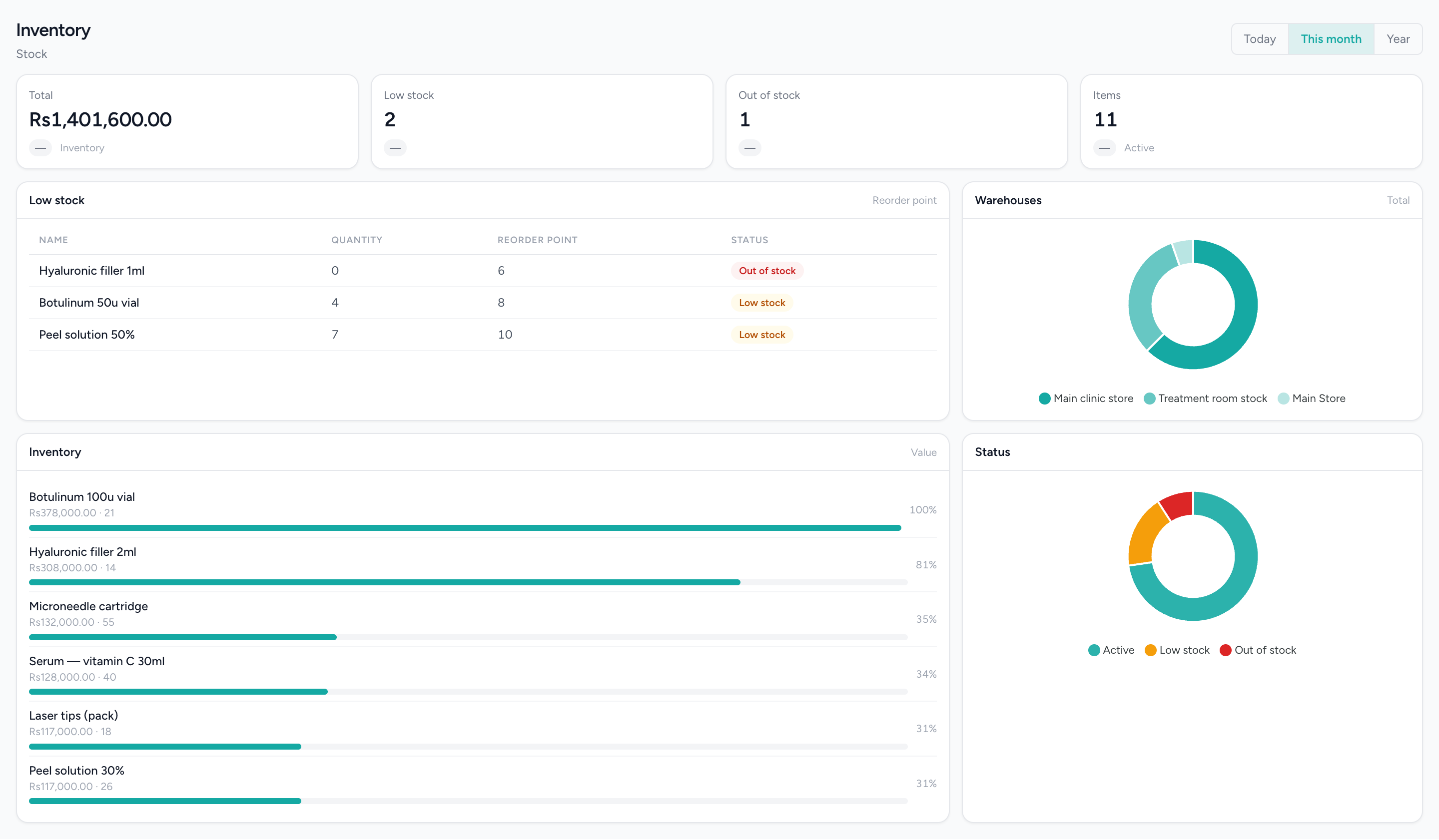
Know what is on the shelf before you run out
Stock value, the low and out-of-stock counts, and a reorder table naming each item against its reorder point.
Who uses it, and for what
The owner
Takings by counter and by branch, the drawer variance at every close, stock value at cost, who owes the business and who it owes, and a profit and loss per location — read from the same records the shop wrote during the day, once they have synced.
The cashier
A PIN on the terminal, a scanner that just types, the customer looked up once, the payment recorded the way it was taken, and a receipt on screen. A discount, void or refund goes to a manager's PIN and a reason, so the cashier is never the one explaining a short drawer.
The stock keeper
Products and variants with their own SKU and barcode, imported from a spreadsheet with a preview; reorder points per branch; goods received against the purchase order rather than typed in; wastage as a recorded movement; and transfers between branches that leave a record.
The accountant
Bills that post to stock and payables on approval, a moving average cost that the valuation and cost of sales both read, invoices and payments that post as they are issued, and a ledger with a named permission for the ledger and nothing else.
What runs today
Everything in this section can be shown on a live system today.
A till that trades with the internet down
A set-up terminal holds the catalogue, prices, taxes, staff and customers in its own database and records orders, payments and cash movements locally. Several counters share one trading day over the shop's own network and elect a coordinator between themselves.
Scanners that just type
Any standard USB or Bluetooth barcode scanner of the keyboard type works on the order screen with nothing to install. Camera scanning is not built.
Cash control on every counter
A drawer per terminal on a carried-over float, cash in and out with a reason, a counted close with the variance shown, and discounts, voids and refunds behind a manager PIN with a reason recorded.
A second screen for the customer
A second monitor on a Windows counter, or a tablet paired over the shop's network, showing the order as it builds, taking the tip and the rating. The customer never pays or orders from it.
Stock and purchasing, end to end
Variants, a spreadsheet importer, reorder points, stock per branch and warehouse, transfers, and the purchasing chain from request for quotation to payment made — bills posting on approval and a moving average cost per item and branch.
Trade sales and the books
Estimates, sales orders, invoices on credit, payments received with allocation, statements and aging; a double-entry ledger with a seeded chart of accounts; and profit and loss by branch under one login for every location.
Upcoming · designed, in build
Retail POS edition
Designed and in build. Nothing below is in the product yet; it is listed so you can see where the platform is going for this trade, not to be quoted or demonstrated.
Shifts with an opening float per register
A cashier starts a shift on a named register with its own opening float, so the count at the end is against that register and that person.
Held sales
Park a sale while the customer fetches one more thing, serve the next person, and bring it back.
Online orders with delivery and pickup
Orders from outside the shop surfaced on the till itself, marked for delivery or pickup.
Returns and exchanges
A return or an exchange as its own screen on the till, against the original sale.
Stock count, stock adjustment and receive stock
Counting the shelf, adjusting a figure and booking a delivery in from the till, where today each of those is a back-office screen.
Shift summary and stock movement reports
A summary per shift and a movement report per item, read on the terminal.
Split payment
A dedicated split-tender screen on the retail till. Today an order already takes more than one payment line; the edition gives the cashier a screen built for it.
What it does not do
In this trade's own words: what people ask for that the platform does not do.
- No weighed items. There is no scale integration, no PLU code and no per-kilo pricing; loose produce, fabric by the metre or anything sold by weight is not modelled.
- No gift cards, store credit or layaway, and the till does not process cards. A card or wallet payment happens on your own machine and is recorded against the order here; online payment is available to beauty and wellness businesses through IMBeautyGlow.
- Stock is deducted in the cloud when the order syncs, not on the terminal, and a refund at the till returns nothing to the shelf — the stock is put back by an adjustment in the back office. Purchase orders, goods receipts and stock counts are back-office screens today.
- The till has one order path and it asks for a named customer with a mobile number before it takes money. That is right for a customer you want a record of and slower than a supermarket till for one anonymous item.
- No online shop for retail yet, and no feed from marketplaces or delivery apps. Online ordering is available to beauty and wellness businesses through IMBeautyGlow.
Questions from businesses like yours.
What owners ask before they move a live business onto a new platform.
Can IMFlow360 sell by weight, like loose produce or fabric by the metre?
Not yet. IMFlow360 has no scale connection and no price per kilo or per metre; every item sells as a unit at its own price, with variants for size or colour. If much of what you sell goes on a scale, tell us at the demo.
Can customers order online and collect in my shop?
Not for retail shops yet. Online ordering with collection is available to beauty and wellness businesses through IMBeautyGlow. Retail shops sell through the IMFlow360 till and web dashboard today.
Can I sell to trade customers on credit?
Yes, from the IMFlow360 web dashboard. Turn a quotation into a sales order and an invoice with payment terms, then record payments against the invoices they cover; customer statements and the ageing report show who owes what. Reminders aren't sent automatically.
I have two tills. Does each have its own cash drawer?
Yes. Each IMFlow360 till opens and counts its own drawer, while both share the same business day and open orders over your shop's network, so a sale started at one can be paid at the other. The day closes when the last drawer does.
Solutions for this business
- Stock & Purchasing ControlKnow what you bought, what arrived, and what you still owe for it.Read more
- Cash & Till ControlEvery rupee in the drawer explained: floats, variances, voids and the day close.Read more
- Sell Online & In-StoreOne catalogue, one stock, two doors.Read more
- Financial ControlYour books in the same system as your tills, closed month by month.Read more
- Multi-Location OperationsRun five branches like one business, and read them like five.Read more
The platform behind it
- Point of SaleOffline-capable tills that cluster over your own network, with drawer control and PIN-gated voids.Read more
- InventoryStock that moves when a sale syncs, with goods received, transfers and reorder points.Read more
- PurchasingVendors, quotations, purchase orders, goods receipts, bills and payments made.Read more
- CommerceOnline booking and shopping through IMBeautyGlow.Read more
- Accounting & FinanceA real double-entry ledger: chart of accounts, vouchers, periods, and the statements that come off them.Read more
- Multi-LocationOne login, branch-scoped stock, staff and figures, and a P&L per location.Read more
One figure for the shelf, the till and the books.
Bring a product list and a supplier bill and we will show you the scan, the close and the ledger on a live system with the internet unplugged. Email sales@imflow360.com or book a walkthrough.