Back office
Projects & tasks
Not every job goes across a counter. Fit-outs, campaigns, onboarding a new branch, an implementation for a client — the work that takes weeks and involves half the team lives here instead of in a chat thread.
A project register and a board that keeps itself current
Built for the work your business runs on the side of the shop floor, with the same roles and the same tenancy as everything else.
Projects with codes, owners and a team
Every project gets a generated code, a customer, a project leader and a searchable team roster. Nine preset types — implementation, maintenance, consultancy, design, marketing, internal and more — plus priority, start and end dates, and a status from Draft through Active to Completed.
A task board with live counts
Pending, In Progress, Review, On Hold and Completed, each with a running count, and cards you can drag to reorder within a status. Moving a task to another status is a deliberate action from the card menu rather than an accidental drag.
Subtasks, so a task can be a checklist
Break any task into steps with their own status and priority, and tick them off one at a time without losing the parent.
Comments, chat and files on the task itself
A comment thread on every task with file attachments up to 20 MB, delivered live to anyone with the task open. Status changes write themselves into the thread, so the conversation and the history are the same record. There is also a cross-project comment feed, searchable.
Recurring tasks that create themselves
Daily, weekly, monthly, quarterly, half-yearly or yearly templates with a start date, an expiry and a due-date offset. They generate on a nightly schedule, and there is a Run now button for when you do not want to wait.
Progress you do not have to update
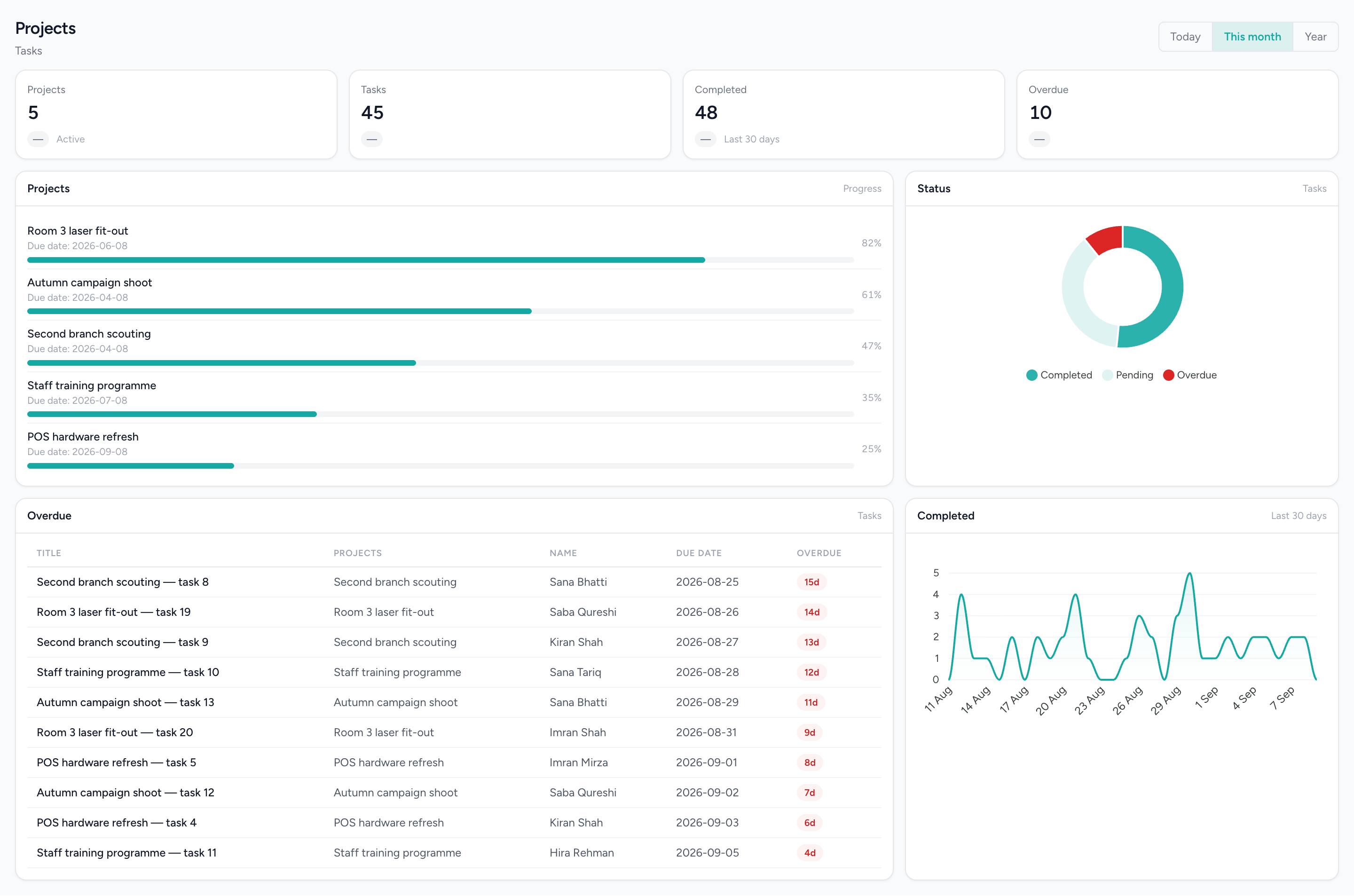
A project’s completion percentage is worked out from its completed and open tasks and recalculated whenever a task changes — so it is never the number somebody last remembered to type in.
A record of who did what
An activity trail on every project covering task creation, status changes, archiving and restoring, alongside two exportable reports: task counts and overdue tallies per employee, and a single employee’s task list. Both filter by project and date range, and export to PDF and Excel.
Find the project you meant
Tabs for All, Active, Overdue, My projects and Archived, with filters on type, customer, leader, team member, priority, status and date range. Archive and restore rather than delete, and duplicate a project to reuse its team.
People see their own work
Fourteen permissions across projects and tasks, including a genuine restriction that limits someone without management rights to the tasks they are assigned or created. Multi-branch and multi-business throughout, and covered by cross-tenant tests.
Internal work, tracked where the money is
Fit-outs, campaigns and equipment rollouts with their progress, and the overdue tasks named against the person who owns them.
Questions people actually ask.
The answers a decision-maker needs before booking a demo.
Does IMFlow360 have time tracking or timesheets for projects?
Not yet. IMFlow360 projects don't include a timer, timesheets or logged hours. You can record a rate on a project, and each task tracks its status, priority, assignee and due date.
Can I create an invoice from a project in IMFlow360?
Not yet. A project is linked to its customer, but there's no "bill this project" button. Raise the invoice in Sales and Invoicing, where it goes into your accounts as usual.
Does IMFlow360 notify staff when they're assigned a task?
Not yet by email or push notification. Comments and files posted on a task appear instantly for anyone who has it open, and staff find new work on the board, under My Projects, or on the Overdue tab.
Can a task have more than one assignee in IMFlow360?
No. Each IMFlow360 task has one assignee, so it's always clear who owns it. When two people share the work, split it into two tasks or use subtasks.
Does IMFlow360 have Gantt charts or task dependencies?
Not yet. IMFlow360 projects use a status board, a filterable task list and a progress percentage for each project. There's no Gantt chart, timeline, calendar view, task dependencies or milestones.
Can IMFlow360 create recurring tasks?
Yes. Set up a recurring template — daily, weekly, monthly, quarterly, half-yearly or yearly — and IMFlow360 creates the task automatically each night, with a Run now button when you don't want to wait. The nightly run needs the scheduler set up on your server, which is done during installation.
How does IMFlow360 calculate project progress?
From the tasks. A project's percentage is the share of its tasks that are complete, updated every time a task changes, so it's always current. Every task counts equally, whatever its size.
Are IMFlow360 project tasks the same as CRM tasks?
No. CRM tasks belong to leads, companies and contacts in the IMFlow360 CRM, which is available as a separate subscription, while project tasks belong to projects. The two are kept in separate lists.
Popular with
- Aesthetic ClinicsCourses of treatment across several visits, with the room and the practitioner booked together.Read more
- Bridal & MakeupOne job with many people, many dates and money arriving over months.Read more
- RetailShelf, till and books that agree: barcode sales, stock, purchasing and cash control.Read more
Related capabilities
- HR & PayrollRoles, shifts, attendance, leave, documents, hiring and payroll runs.Read more
- Analytics & ReportingSales, staff and stock reports scoped to the branch you are in, and the numbers behind them.Read more
- Multi-LocationOne login, branch-scoped stock, staff and figures, and a P&L per location.Read more
Stop running the projects half of the business out of a chat thread.
We will show you the module on a real dataset and tell you plainly what it does not do yet. Email sales@imflow360.com or book a walkthrough.