The staff admin nobody has time for
Most salons and clinics run their people on a WhatsApp group, a paper attendance book and a spreadsheet somebody rebuilds every month. It works until it is payday, or somebody leaves, or two people booked the same day off.
How it usually goes
The attendance book lives at the front desk and the payroll spreadsheet lives on a laptop, so every month somebody types one into the other. That retyping is where the arguments come from — a missing half-day nobody can prove either way.
Leave is agreed in conversation and remembered by whoever was in the room. Two people take the same Friday, and the rota is short on the busiest day of the week.
And when you hire, the CVs sit in an inbox. Nobody can say who was interviewed, what was decided, or why the good one from six weeks ago never got called back.
From rota to payday, in one record
The same person record carries the shift, the clock-in, the leave, the sales they made and the payroll line — so nothing is typed twice.
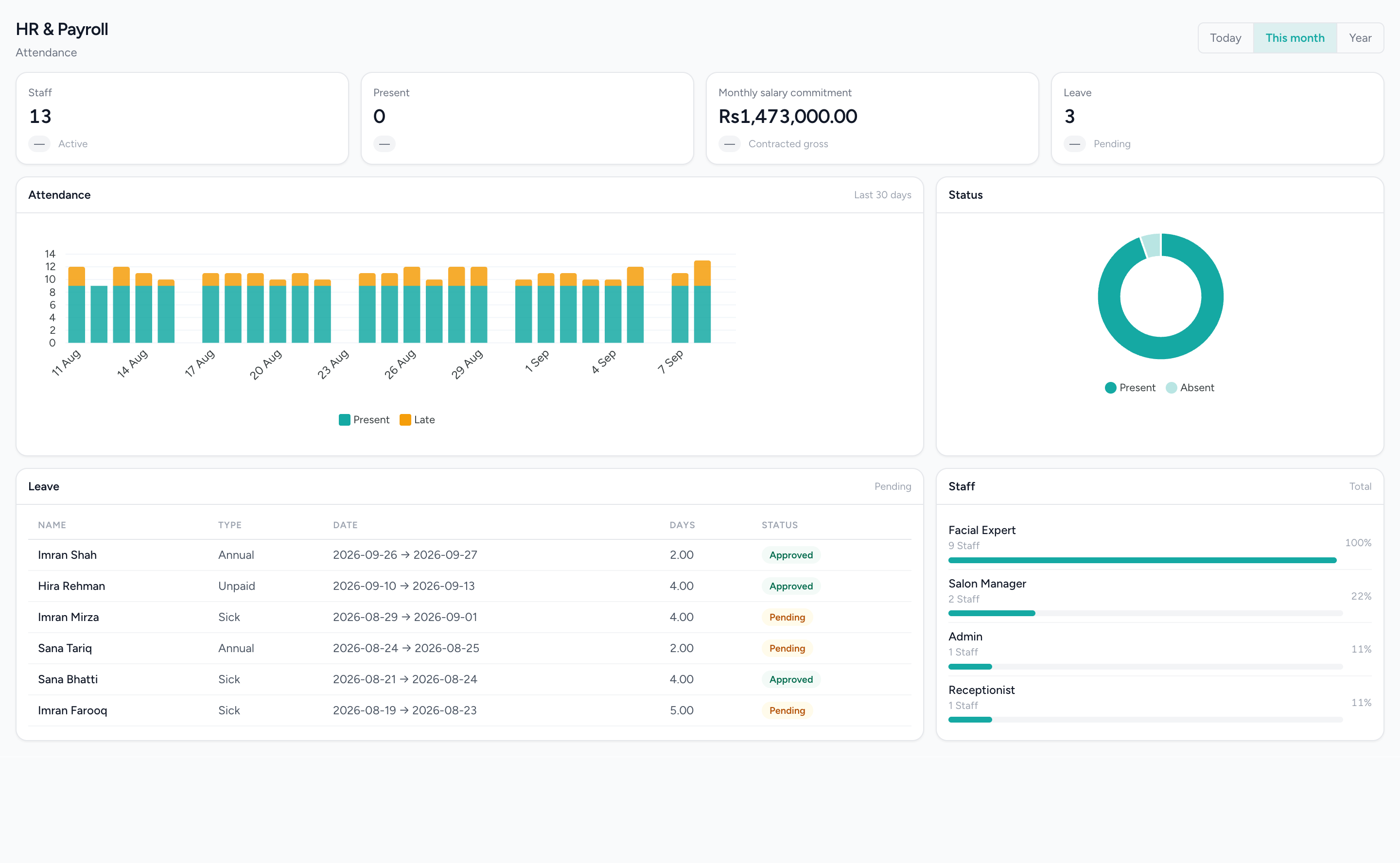
The team, on one screen
Headcount, who is in, the leave queue and thirty days of attendance with late arrivals marked — read from the clock-ins the tills recorded.
What changes
Attendance that records itself
Clock-ins from the till or a biometric device, held against the person and the day, with a filled-DTR history you can look back through. Corrections go through an approval rather than an eraser.
Leave with a decision attached
Leave types you define, requests from the person, an approval queue for the manager, and encashment where you allow it. The rota shows who is already off before the second request is agreed.
A payroll run, not a spreadsheet
Salary structures per employee, with additions and deductions, run as a payroll run that keeps its own lines and line items. It is a record of what was calculated and paid, held in the same system as the attendance it was calculated from.
Documents that expire
Contracts, IDs and certificates held on the employee record with types you define and an approval step, so the thing you need in an inspection is not in somebody’s drawer.
Hiring as a pipeline
Job posts, applicants, and hiring stages an applicant moves through, with interviews and written evaluations against each one. Six weeks later you can still see who said what.
Leaving, handled once
An exit clearance that names what has to come back and who signs it off, so the last day is a checklist rather than a series of phone calls.
What it does not do
Worth knowing before a demo rather than after one.
- Sales are attributed to the person who made them. That is attribution, not commission — there is no commission engine in this product, and no rate or payout column anywhere.
- Nothing is sent to staff. There is no SMS channel and no WhatsApp sending, so an approval is something a person sees when they open the system, not a message that arrives.
- Payroll produces a record of what was calculated. It does not file anything with any authority and does not move money.
Questions about this workflow.
What owners ask before they move a live business onto a new platform.
Does IMFlow360 calculate payroll or just record salaries?
It calculates payroll. Each employee has a salary structure, additions and deductions are applied, and every payroll run keeps a full record of what was calculated and paid. IMFlow360 doesn't file with tax authorities or transfer the money; you pay through your bank as usual.
How does attendance get into IMFlow360?
Staff clock in and out on the IMFlow360 till, and you can upload the attendance file from a fingerprint machine such as ZKTeco. Each month's attendance sheet goes through approval, and corrections go back through approval rather than being edited quietly.
Can staff request leave in IMFlow360?
Yes. Staff you give access to can request leave against the leave types you set up, and managers approve it on screen. No email or message is sent yet, so staff see the decision the next time they open IMFlow360.
Does IMFlow360 calculate staff commission?
Not automatically. IMFlow360 records sales, services and tips against each staff member, so commission can be worked out from the sales-by-staff report; automatic commission calculation isn't available yet.
Can I manage hiring in IMFlow360?
Yes. Post jobs, move applicants through hiring stages, schedule interviews and record each interviewer's score and comments, so you can always see who was interviewed, by whom and what was decided. Applicants can't apply online yet.
Powered by
- HR & PayrollRoles, shifts, attendance, leave, documents, hiring and payroll runs.Read more
- AppointmentsA diary that knows service duration, leave and clashes before they happen.Read more
- Analytics & ReportingSales, staff and stock reports scoped to the branch you are in, and the numbers behind them.Read more
- Projects & TasksA project register and a board for the work that is not a booking.Read more
Built for
- Hair SalonsBuilt around the chair — stylists, colour services and the client who asks for one by name.Read more
- RestaurantsOrders, cash and stock that agree at close, on tills that keep working offline.Read more
- RetailShelf, till and books that agree: barcode sales, stock, purchasing and cash control.Read more
- Spas & WellnessRooms and therapists booked as one, with prepaid courses on the customer record.Read more
See it against your own work
Rotas, permissions down to the individual action, and the attendance and payroll screens in full.